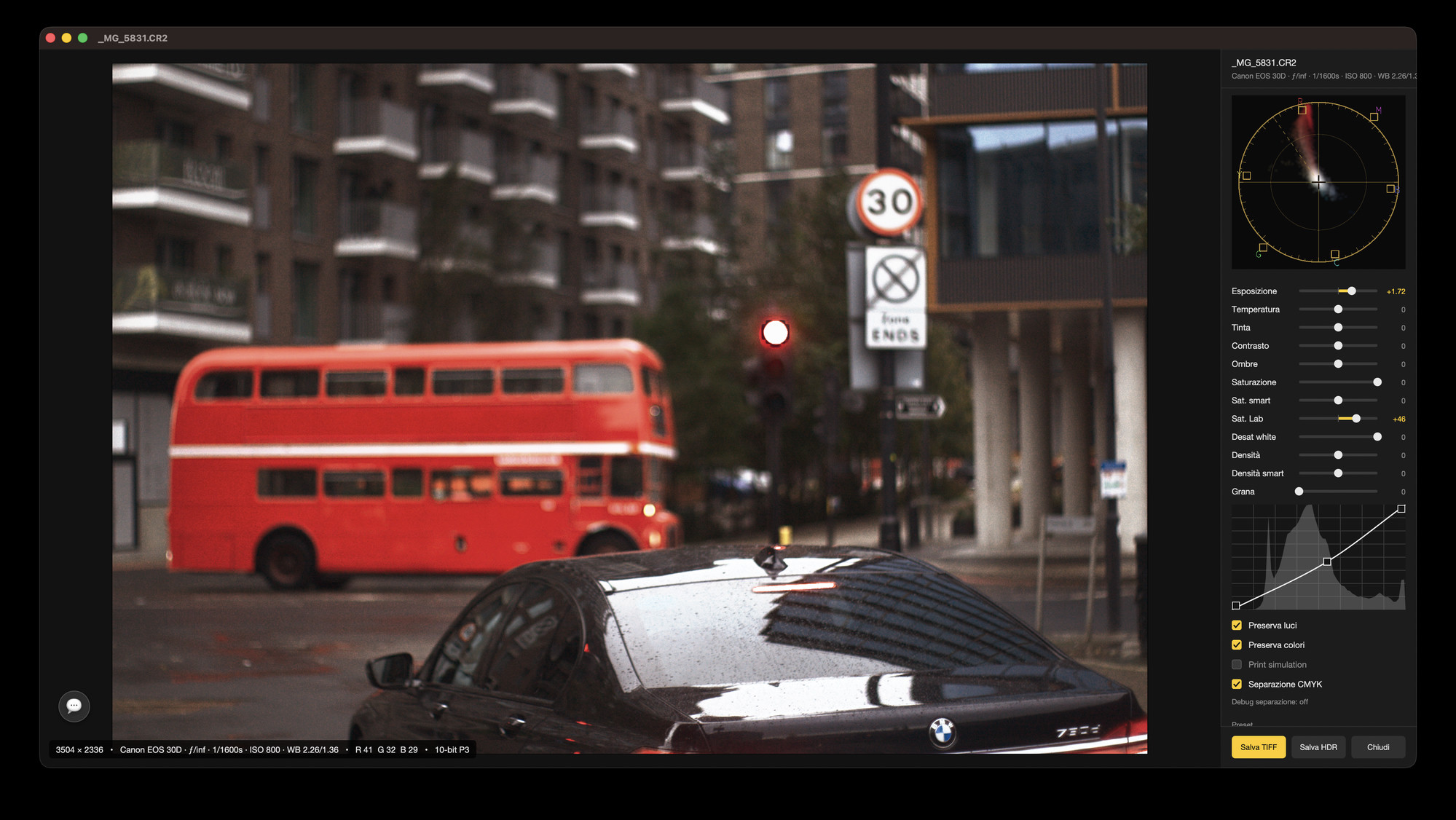
Golden Gate is a native Mac RAW browser and developing editor. Point it at a folder of raw files and the whole shoot is on screen at once, on the GPU; open a frame and develop it — exposure and white balance, a free-form tone curve, twenty film looks, OpenFX plugins — then write the settings to an XMP sidecar Adobe can read, or export a 16-bit TIFF.
This is the first public build of a young app. It is signed by RainbowFactory LTD and notarised by Apple, it keeps itself up to date, and it is a beta: work on your own copies of your files and tell us what breaks — Help ▸ Send Feedback… sends the report straight to us.
crs namespace, 16-bit TIFF, and HDR HEIC in PQ.Golden Gate opens a folder the way the Finder does — and then draws it the way a photo app should. Thumbnails are mipmapped GPU images on a Skia-on-Metal grid, so pinching from a contact sheet down to a single frame is a redraw, not a reload; a multi-resolution cache and a tiled pyramid keep even very large TIFFs moving while you pan and zoom.
Open a frame and you are in the develop window. The raw file is decoded to linear half-float and everything you change — exposure, white balance, the curve, the film look, the plugins — is applied to that, on the GPU, while you drag. Nothing is written into your originals: the settings live in an XMP sidecar next to the file, in the same crs namespace Adobe uses, so Camera Raw and Lightroom read what you did and you can walk away from this app whenever you like.
⌘E opens the frame in the in-house engine: a Rust RAW decoder (rawler) that hands back linear half-float data, developed by our own Metal chain. ⌥⌘E opens the same frame through Apple's CIRAWFilter. Two renderings of one negative, a keystroke apart, because no single demosaic is right for every camera and every picture.
Everything below is in the build you can download today. It is a first release: expect rough edges, and expect this list to grow.
Skia on Metal, mipmapped GPU thumbnails, pinch and ⌘-scroll zoom, folder tree, drag and drop, multi-selection and star ratings written to XMP.
Exposure, white balance by temperature and tint, contrast, shadows and highlights, and the whole saturation family — vibrance included.
A real curve editor drawn with NanoVG: add points anywhere, drag them, and watch the picture follow while you drag.
A live vectorscope beside the picture, so a colour grade is something you can see as well as judge.
A preserve-highlights fusion pass rebuilds blown skies from the raw headroom instead of clipping them to paper white.
Portra 160/400/800, Gold, UltraMax, Ektar, Ektachrome, Kodachrome, Velvia, Provia, Pro 400H, C200, X-Tra and the Vision3 2383 print stocks, with film grain.
A plugin host that renders on Metal, with the parameter palettes ported from Photo Editor Pro. Dehancer, Filmbox and openfx-misc load as they are.
A CMYK print preview inside the develop window: see what the paper will do before the paper does it.
Level a horizon and the pixels are actually rotated — one undo step, no orientation flag left behind for another app to misread.
The app does the crossing that photographers do every day: from a folder of raw files nobody can see, to a picture somebody can. It browses like a viewer and develops like a darkroom, and it hands the result to whatever comes next — Camera Raw, a print shop, or a 16-bit TIFF in a layered editor.
It is built on the same Skia-on-Metal engine as the rest of the suite, which is why the grid stays smooth over folders that make other browsers stop and think.
What is in 26.0 →
26.0 is the first build we have published. The chain around it is finished — signed with our Developer ID, notarised by Apple, updating itself through its own appcast — but the app behind it is young: there is no catalogue, no printing dialog, and some formats are better served than others.
Work on copies, keep your originals backed up, and send what goes wrong: Help ▸ Send Feedback… (⇧⌘F) files a report with the log attached, and the floating feedback chat (⌥⌘F) is the fastest way to reach us.
Version 26.0, the first public release. Direct download only — signed, notarised, and it updates itself.
The download is signed by RainbowFactory LTD and notarised by Apple, so it opens straight away, and Check for Updates… in the Golden Gate menu keeps it current. Being a beta, it can lose your develop settings or misread a file: keep your originals safe and tell us what happened — Discord, or Help ▸ Send Feedback… inside the app.