Prism for Mac

Non-linear photo editing.

Most editors apply adjustments as one fixed stack. Prism develops each photograph as a graph: every node is a complete RAW development with its own masks, and you connect the nodes in series, in parallel, in layers or by channel, reorder them, bypass them and compare them at any time. The original never changes. Keep the photos in a catalogue, shoot tethered, then print, publish or export.
Download for MacWhat is inside
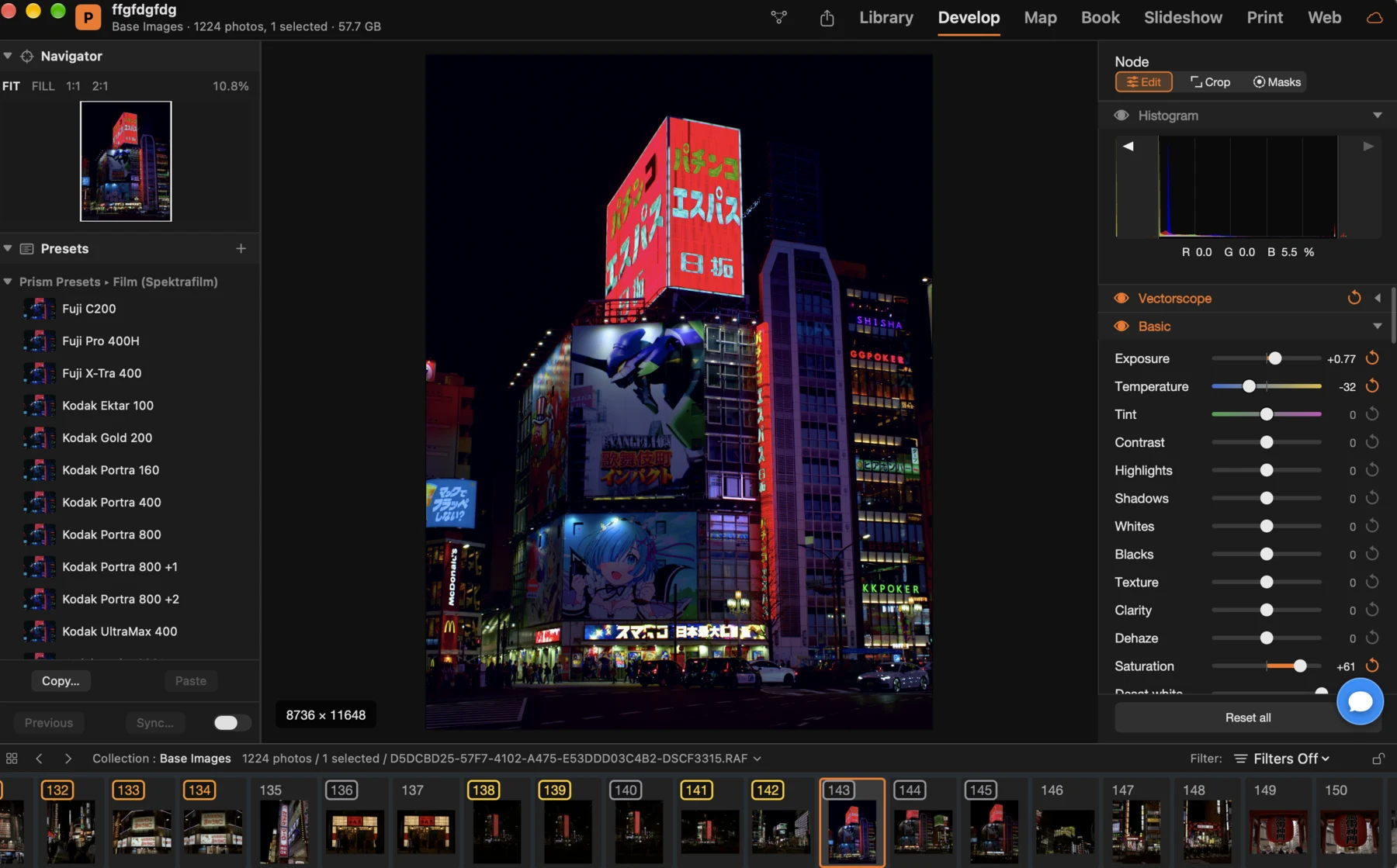
Prism Develop module: a night photo of neon signs in Tokyo, the Navigator and presets on the left, the node's histogram and Basic sliders on the right, the filmstrip below

Prism is new. Found something wrong or missing? Help › Send Feedback inside the app sends the report straight to us.

Why non-linear

One photo, many developments, no fixed order.

Each node of the graph is a complete RAW development: exposure, colour, tone curves, HSL mixer, film and print simulation, lens corrections, crop. Add a mask to a node and it limits that node alone; add a parallel branch and the two developments are summed; add a layer and they are composited.

Organise the library.

Import from cards, cameras and folders. Folders, collections and smart collections, keywords with hierarchies, ratings, flags and labels, a map for the photos with a location, a filter bar and a Loupe, Compare and Survey view.

Develop with masks and plugins.

Radial, linear and brush masks, plus subject, sky, background and people masks computed on the Mac. OpenFX plugins run inside a node. Save a whole graph as a PowerGrade and apply it to another photo in one click.

From the camera to the page.

What Prism does.

Tethered capture

Connect a camera over USB or the network, see its settings in the bar, trigger the shutter and watch the photos land in the catalogue with the develop you chose.

Book, Slideshow, Print, Web

Lay out a photo book, run a slideshow, print with sharpening and colour management, or publish an HTML gallery.

Sidecars you keep

Every development is written next to the photo as a standard XMP sidecar, with Prism's graph inside, so nothing is locked inside the app.

Export and publish

Export presets, watermarks, file naming templates, email, and publishing services.

Scriptable

Every command of the app is available to AppleScript and to an AI assistant, so a script or an assistant can run your library.

System requirements

What Prism needs to run well.

Mac

Apple silicon (M1 or later) or Intel: one download for both.

macOS

macOS 14.6 Sonoma or later, including macOS 26 Tahoe.

Memory

8 GB minimum, 16 GB recommended.

Disk

About 400 MB for the app. The catalogue and the previews grow with your photos; the space they may use is yours to set in Settings › Performance.

Display

A display of at least 1024 × 640. Wide-gamut and HDR displays are used when present.

Cameras and network

Tethered capture over USB or network for the supported cameras (the list is in the app, File › Tethered Capture › Supported Cameras). An internet connection for updates; an iCloud account only if you turn on sync.

Part of the Creator Suite.

Retouch a developed photo in Flare, place it on a page in MasterPage, or browse the whole library with Lighthouse. Same files, same Mac.

See the apps →