Vector Designer 26.24 for Windows is on the Windows page and reaches installed copies through the in-app updater. This one is about drawing by hand.
Brushes on any path
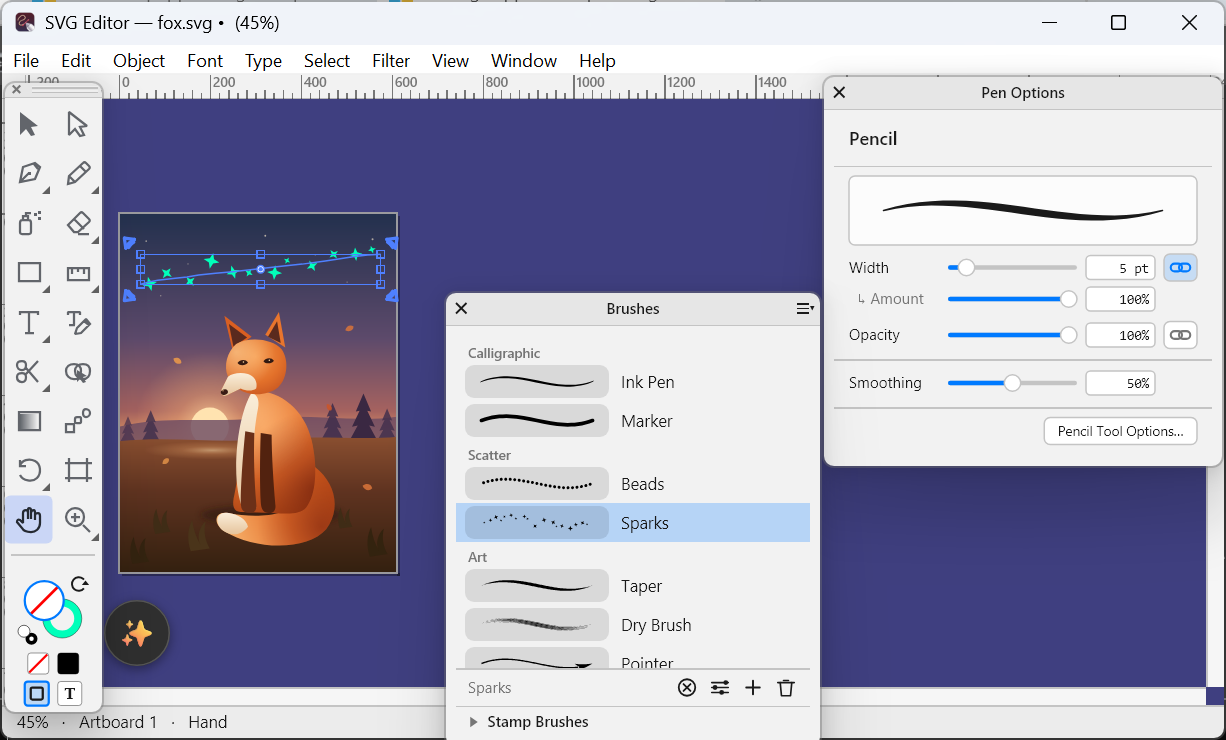
Select a path and click a brush in the new Brushes palette: calligraphic, scatter, art, pattern or bristle, with ten ready-made presets to start from. The brush stays live, so you can keep moving anchors and the stroke follows. Brush Options keeps each setting fixed, varies it at random or lets pen pressure drive it, and Object › Expand Appearance turns the result into ordinary shapes when you are done.
Paint as you go
The Paintbrush, in the Pencil group of the Toolbox, draws with the current brush and shows the stroke while your hand is still moving. With a pen tablet or a pen display, pressure shapes the stroke anchor by anchor. The new Path Eraser (Shift+E), in the Eraser group, wipes away the part of a path you drag over.
Pen Options
Window › Pen Options opens a palette that links the pressure, speed and tilt of your pen to the size and opacity of the Pencil, Paintbrush, Spray and Eraser. It follows the tool you pick, so each one keeps its own settings.
Colour, and your messages
In the colour picker a colour reaches your drawing only when you press OK, so trying colours no longer changes the artwork behind the dialog, and the hue strip shows full colours. Sending feedback is more reliable.
Keep the reports coming through Help › Send Feedback: every one is read.