First public release · beta

Your shoot, straight from the card

Lighthouse is a native Mac RAW browser and developing editor. Point it at a folder of raw files and the whole shoot is on screen at once, on the GPU; open a frame and develop it — exposure and white balance, a free-form tone curve, twenty film looks, OpenFX plugins — then write the settings to an XMP sidecar Adobe can read, or export a 16-bit TIFF.

Direct download: version 26.0.21 beta · 26 MB · .dmg · signed & notarizedmacOS 12 or later · Apple siliconUpdates built in

This is the first public build of a young app. It is signed by RainbowFactory LTD and notarised by Apple, it keeps itself up to date, and it is a beta: work on your own copies of your files and tell us what breaks — Help ▸ Send Feedback… sends the report straight to us.

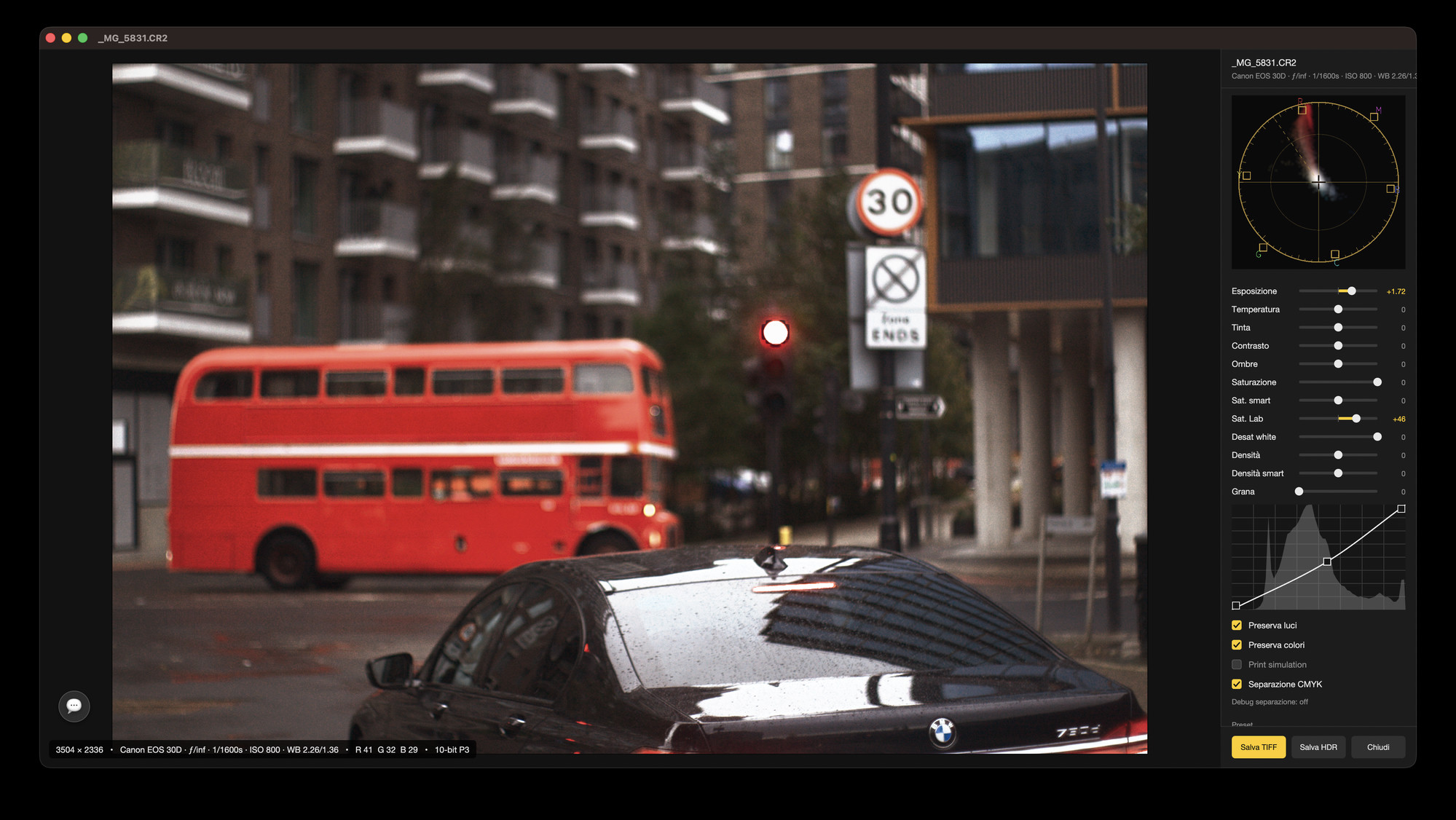
Lighthouse developing a Canon RAW photo of a red London bus: exposure and saturation sliders, vectorscope, tone curve and CMYK separation options
BrowseYour whole shoot on screen at once: zoom, arrow through, select and rate without waiting.
DevelopExposure, white balance, contrast, shadows, the saturation family and a free-form tone curve, on the raw data.
FilmTwenty film emulation LUTs — Portra, Gold, Ektar, Velvia, Provia, Vision3 print stocks — plus grain.
PluginsDehancer, Filmbox and other OpenFX effects load as they are.
DeliverEdits Lightroom can read, print-ready 16-bit TIFF, and HDR photos for modern screens.
A browser and a darkroom, not a catalogue

The folder is the library. Nothing to import, nothing to wait for.

Lighthouse opens a folder the way the Finder does — and then draws it the way a photo app should. Pinch from the contact sheet down to a single frame without waiting, and pan even huge files without a stutter.

Open a frame and you are in the develop window. Everything you change — exposure, white balance, the curve, the film look — happens live while you drag. Nothing is written into your originals: your edits live in a small settings file next to the photo — the same kind Lightroom and Camera Raw read, so they see exactly what you did and you can walk away from this app whenever you like.

Two RAW engines, one interface

Ours, or Apple's — the same frame, decoded twice.

Every camera renders a little differently, so Lighthouse ships two developers: its own, and Apple’s. If a frame looks better one way, open it the other — same window, same controls, your pick per photo.

ReadsRaw files from Canon, Nikon, Sony, Fujifilm, Olympus, Panasonic, Pentax and Samsung, plus DNG — and TIFF, JPEG, PNG and HEIF alongside them.
WritesXMP sidecars compatible with Adobe Camera Raw, 16-bit TIFF, and HEIC in HDR PQ.
KeepsYour originals. Develop settings are metadata; rotation, when you ask for it, rewrites the pixels honestly rather than hiding a flag in the metadata.
CopiesDevelop settings from one frame to a whole selection — the shoot gets the look, one paste.

What is in the beta

Everything below is in the build you can download today. It is a first release: expect rough edges, and expect this list to grow.

The grid

Pinch to zoom, arrow through frames, drag and drop, select many at once, star what you like — over the whole folder, instantly.

Tone and colour

The knobs a photographer actually reaches for — exposure, white balance, contrast, shadows — and they answer while you drag.

Free-form tone curve

Bend the tones with your own hands: lift the shadows, roll off the highlights, give the frame the curve it deserves.

Vectorscope

See your colours as well as feel them — the scope sits beside the picture while you grade, like in a colour suite.

Highlights that survive

That blown-out sky? Often it isn't gone. Lighthouse digs the detail back out of the raw file.

Twenty film LUTs

Portra for skin, Velvia for landscapes, Vision3 for that cinema feel — twenty film looks, one click each, grain included.

Plugins

Already grade with Dehancer or Filmbox? They load right in, controls and all.

Print simulation

Printing the shot? Preview what the paper will do to it before you waste a sheet.

Straighten

Drag the horizon level and it stays level — one undo step if you change your mind.

Why "Lighthouse"

A bridge between the card and the picture.

The app does the crossing that photographers do every day: from a folder of raw files nobody can see, to a picture somebody can. It browses like a viewer and develops like a darkroom, and it hands the result to whatever comes next — Camera Raw, a print shop, or a 16-bit TIFF in a layered editor.

It shares its engine with the rest of the suite — which is why the grid stays smooth over folders that make other browsers stop and think.

What is in 26.0 →
The Lighthouse application icon: the Lighthouse bridge in red against a golden sky
In the develop window

Everything on the raw data, live.

  • Exposure, white balance, contrast, shadows, highlights, saturation and vibrance.
  • A free-form tone curve and a live vectorscope.
  • Preserve-highlights HDR fusion, film grain, print and CMYK simulation.
  • Twenty film LUTs, and OpenFX plugins with their own parameter palettes.
  • Copy the develop settings and paste them across a whole selection.
Honest about being new

A beta, and told as one.

26.0 is the first build we have published. The chain around it is finished — signed with our Developer ID, notarised by Apple, updating itself through its own appcast — but the app behind it is young: there is no catalogue, no printing dialog, and some formats are better served than others.

Work on copies, keep your originals backed up, and send what goes wrong: Help ▸ Send Feedback… (⇧⌘F) files a report with the log attached, and the floating feedback chat (⌥⌘F) is the fastest way to reach us.

Get the Lighthouse beta Beta

Version 26.0, the first public release. Direct download only — signed, notarised, and it updates itself.

26.0.21 beta · 26 MB · .dmg · signed & notarizedmacOS 12 or later · Apple siliconUpdate feed (appcast)

The download is signed by RainbowFactory LTD and notarised by Apple, so it opens straight away, and Check for Updates… in the Lighthouse menu keeps it current. Being a beta, it can lose your develop settings or misread a file: keep your originals safe and tell us what happened — Discord, or Help ▸ Send Feedback… inside the app.