Keep the highlights above white.
Develop a photo in HDR, see its highlights on an XDR display and export a HEIC or AVIF that keeps them.
Deliver HDR photos
The colour space is per photo.
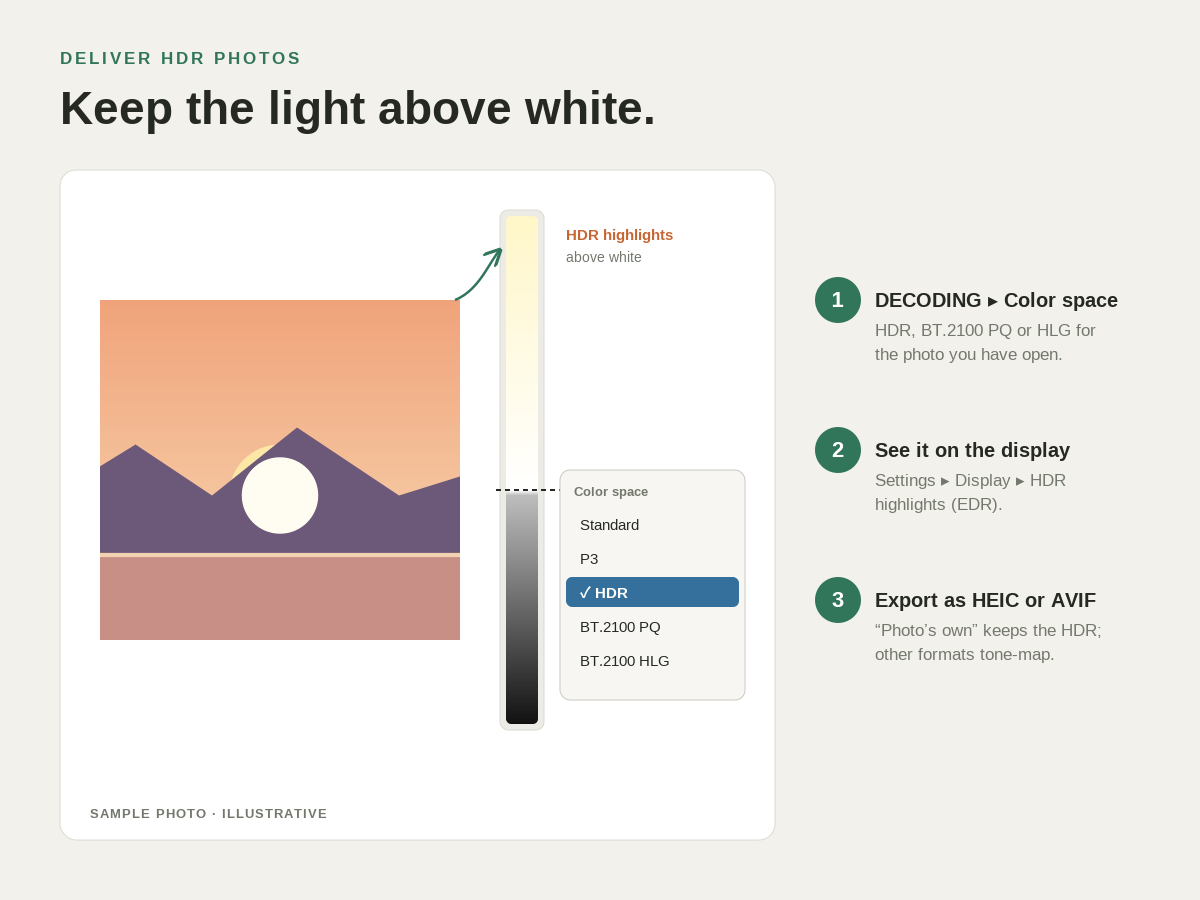
DECODING ▸ Color space chooses what the photo is delivered in: Standard, P3, HDR, Rec. ITU-R BT.2100 PQ or BT.2100 HLG. On a RAW, every choice but Standard needs the Classic or Apple RAW engine.
On a JPEG or TIFF, PQ and HLG read the file’s values as an HDR signal, the way Assign Profile does in Flare; Display P3 (assign) and Adobe RGB (1998) (assign) read an sRGB file as the wider space. A Display P3 photo stays P3 once developed.
Step by step
Try it on your own folder.
- Choose the colour space
Open the photo with ⌘E and set DECODING ▸ Color space. - See the highlights
Settings ▸ Display ▸ HDR highlights (EDR) shows them above white on a display that can. - Export
Edit ▸ Export… with Color space “Photo’s own” in HEIC or AVIF keeps the HDR.
What you get
Keep the light you shot.
HDR that survives the export
HEIC and AVIF carry it; other formats get a tone-mapped sRGB copy.
The same render everywhere
The grid, the viewer and the export all use the photo’s colour space.