Export with one shortcut.
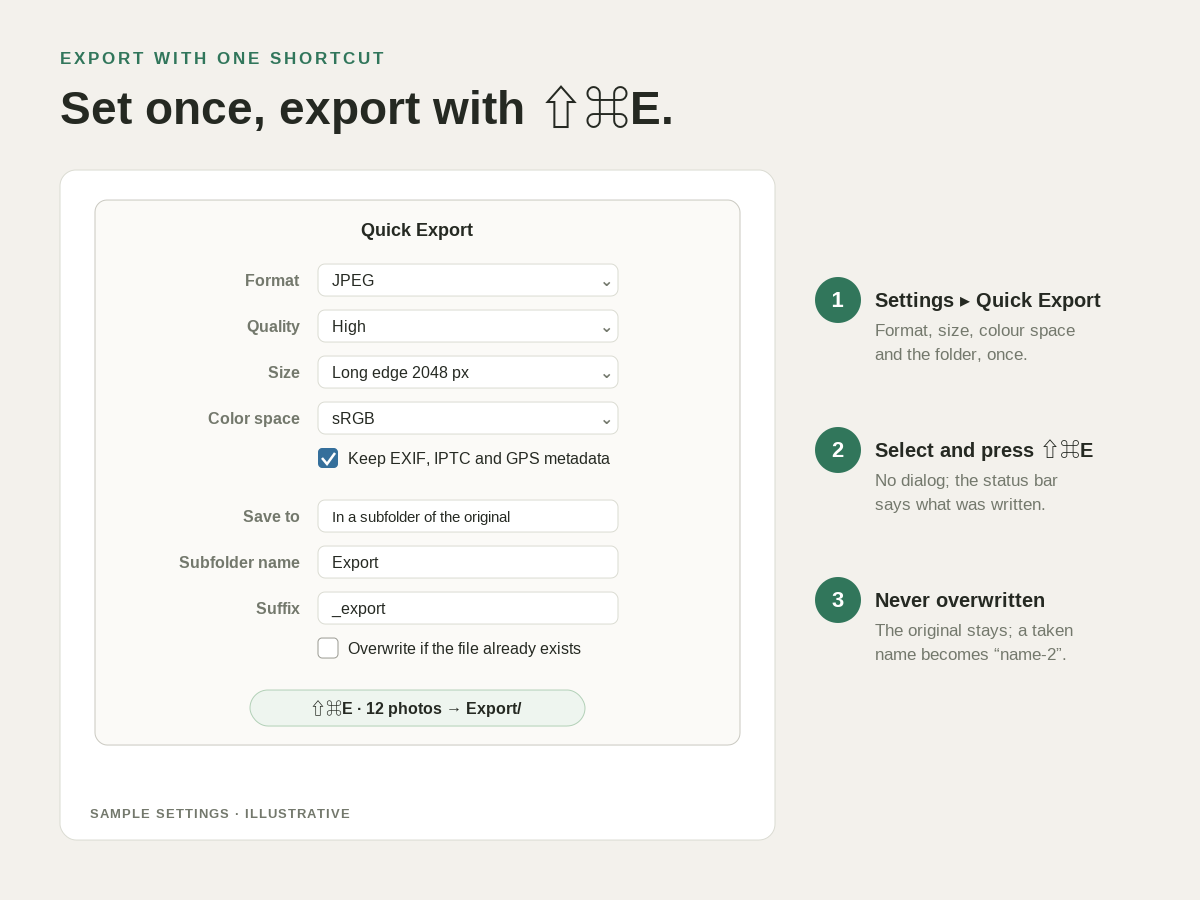
Set the format, size and destination once in Settings ▸ Quick Export; from then on ⇧⌘E writes the selected photos without a dialog.
Export with one shortcut
The settings, once.
Settings ▸ Quick Export holds Format, Quality, Size, Color space and Keep EXIF, IPTC and GPS metadata, then where the files go: next to the original, in a subfolder of it (“Export” unless you name it) or in a folder you choose.
File Name adds a suffix, “_export” unless you change it. With Overwrite off, a file that already exists gets a new name, “name-2”, “name-3”; the original photo is never overwritten.
Step by step
Try it on your own folder.
- Set it once
Settings ▸ Quick Export. - Select the photos
In the grid; with the editor in front, its photo is the one exported. - Press ⇧⌘E
The status bar reports what was written.
What you get
Export without the dialog.
A daily export with no clicks
The same size and folder for every handoff, from the keyboard or the context menu.
Only photos
Clips, audio and vector documents in the selection are skipped and counted.