Keep editing with the disk unplugged.
Lighthouse keeps a local copy of the folder tree and the XMP sidecars of favourites on an external disk, so you can browse, rate and develop while the disk is in a drawer.
Work with a disk unplugged
The favourite stays in the sidebar.
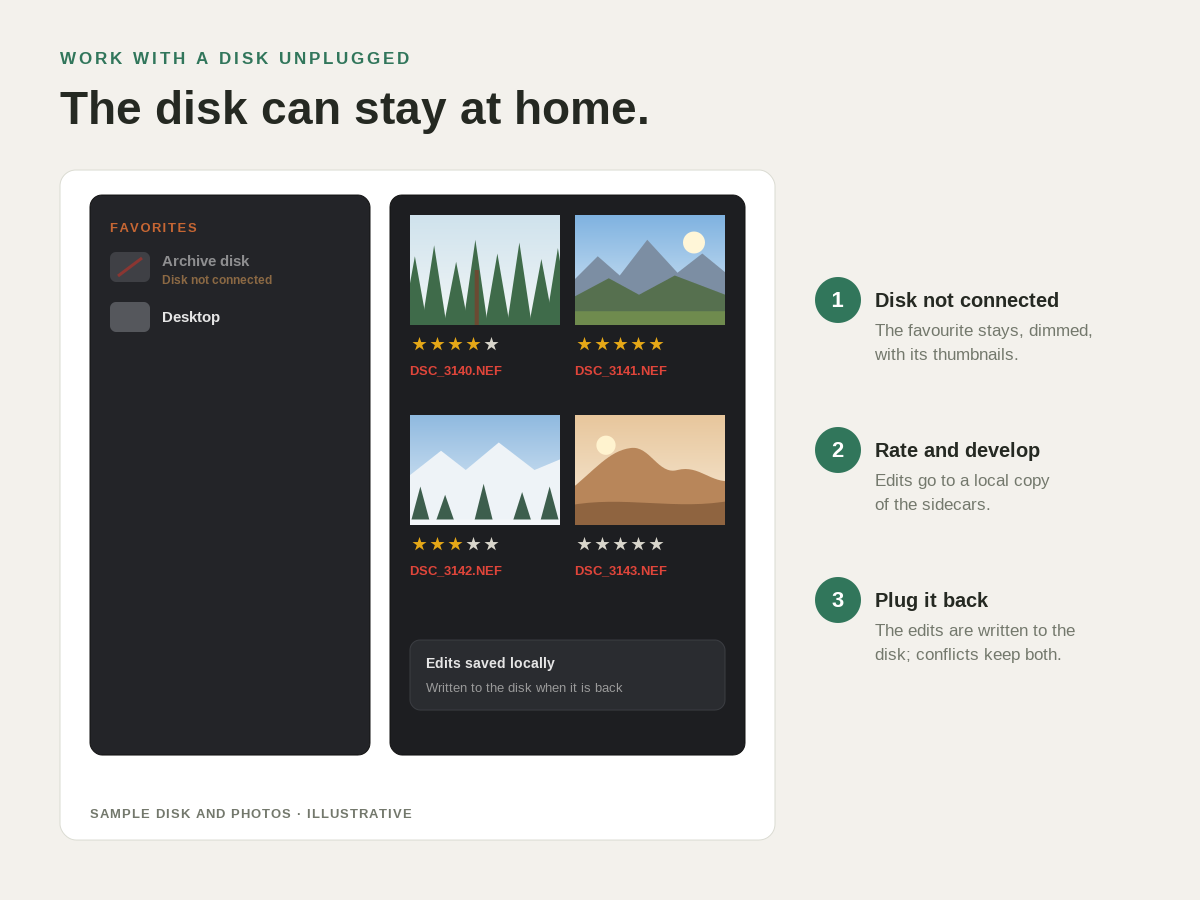
A favourite on an unplugged disk stays in the list, dimmed and marked “Disk not connected”, with its thumbnails. Photos whose original is away have a red title; you can still rate, label, rotate and develop them, and the editor opens the largest preview it has.
When the disk is back, the sidecars edited meanwhile are written to it. If the same sidecar also changed on the disk, the most recent edit wins and the other is kept as a conflict copy and in the photo’s history.
Step by step
Try it on your own folder.
- Add the disk’s folder
As a favourite, while the disk is connected. - Unplug and keep going
Browse, rate and develop from the local copy. - Plug it back
The edits made meanwhile are written to the disk.
What you get
Leave the archive disk at home.
Work on the train
The archive disk can stay at home.
Nothing lost
A conflict keeps both versions.