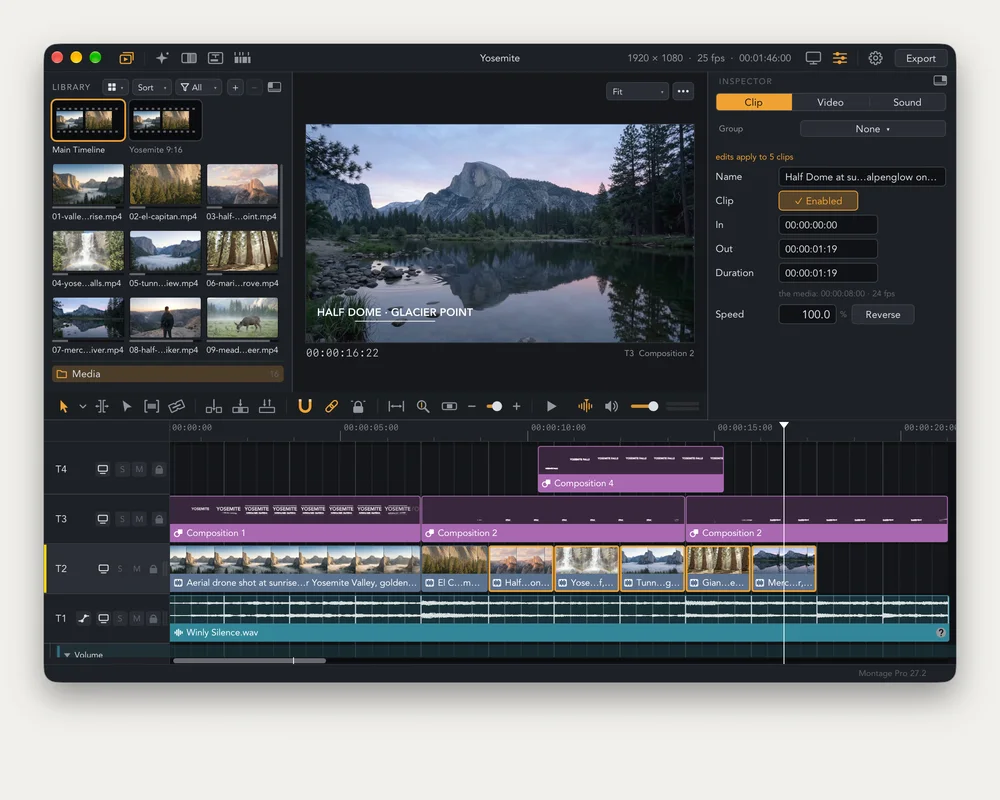
A travel film starts as a folder of clips, a song and an idea for the opening title. A day of travel clips and one song: the film works when the cuts land on the music. Done by hand, that means scrubbing for every beat and trimming every clip to it, then doing it all again when the song changes. Montage Pro finds the beats in the music itself.
Put the clips and the song down
Put the clips of the trip and the song on the timeline, which takes as many video, sound, title, effect and subtitle tracks as the film needs. Montage Pro finds the beats in the music and lays your clips on them.
Give every shot four beats
For a run of shots that should feel even, a sequence of landscapes or a walk through a town, select the clips over the song and choose Clip ▸ Conform to Beat Track ▸ 4 Beats. Each clip becomes four beats long and they sit back to back, so the rhythm of the pictures follows the rhythm of the song for as long as the selection runs. Montage Pro can make each clip a set number of beats long: fewer beats per shot for a passage that should feel quick, more for one that should breathe.
Trim one cut by hand
When a single shot needs to run longer, a slow pan across a valley that deserves its time, trim it with ripple, roll, slip and slide while the viewer shows both sides of the cut. Insert and overwrite work from the keyboard, and any step that does not work can be undone.
Change the song, keep the cuts
Changed your mind about the song? Swap it for another and keep every cut, so trying two or three songs under the same pictures is an afternoon’s work rather than a new edit each time. Then join the shots with a dissolve, a dip or a zoom, grade the colour and export the film in HDR. The opening title comes from the Titles browser: drag a template such as Arc Title over the first shot, type the words in the Inspector, and the title sits on its own track above the footage.
Titles over the shots and the Motion Editor are on the Montage Pro page.