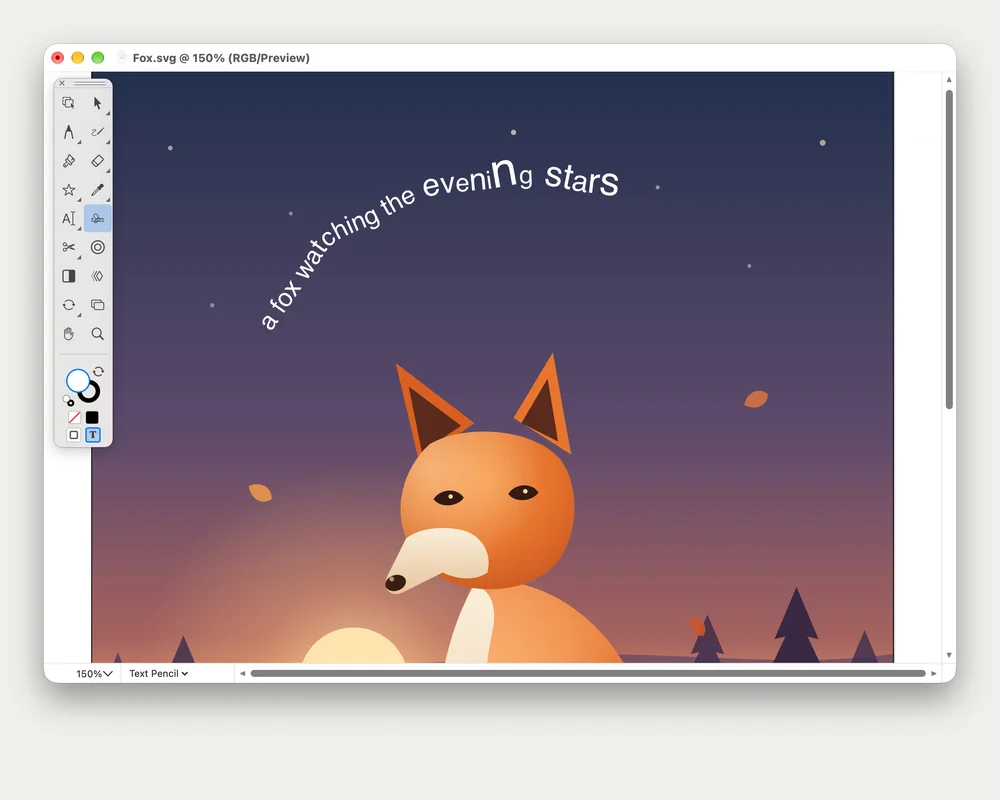
A line of verse across the sky of a poster, a name curling round a birthday card: some lettering should look written by hand, not set in a straight box. In SVG Editor the Text Pencil does it. You type the phrase once, then draw, and the letters follow your hand.
Set the phrase before you draw
Double-click the Text Pencil in the toolbox to open its options. Type the sentence there, pick the font and its size, and choose how the phrase advances: letter by letter, or by whole word. Per word is the safer choice for a long sentence, because a word is never split between two strokes. You can also choose where in the phrase to start, so a stroke can begin from a later word.
Draw, and the sentence follows
Drag across the canvas. The letters lay themselves along the line as it grows, so you see the sentence take shape under the pointer. Lift the pen and draw again: the next stroke carries on the sentence where the last one stopped, and when the phrase runs out it starts over. A long line can wind across a sky in three or four short gestures, each one a curve of its own.
Let the speed of your hand shape the letters
With Size by speed on, the letters grow where your hand moves faster, so a quick sweep at the end of a line comes out larger than the careful start, the way handwriting does. Color by speed blends between a slow and a fast colour: write the calm part of the phrase slowly and the last words in a rush, and the colour shifts along the line with your hand.
Still type, still editable
Each stroke becomes ordinary type on a path. Reshape the path and the text reflows along the new curve; select it and the Character palette still edits its font and spacing. A misspelt word is fixed by retyping it, not by drawing the stroke again.
For lettering on a path you draw first, or text in a shape, see Design labels & lettering; for strokes with the look of ink or a calligraphic pen, Paint with a brush.