Rulers and guides
Show rulers with Command + R, drag guides onto the canvas, lock or hide guides, clear guides, and use Smart Guides while moving objects.
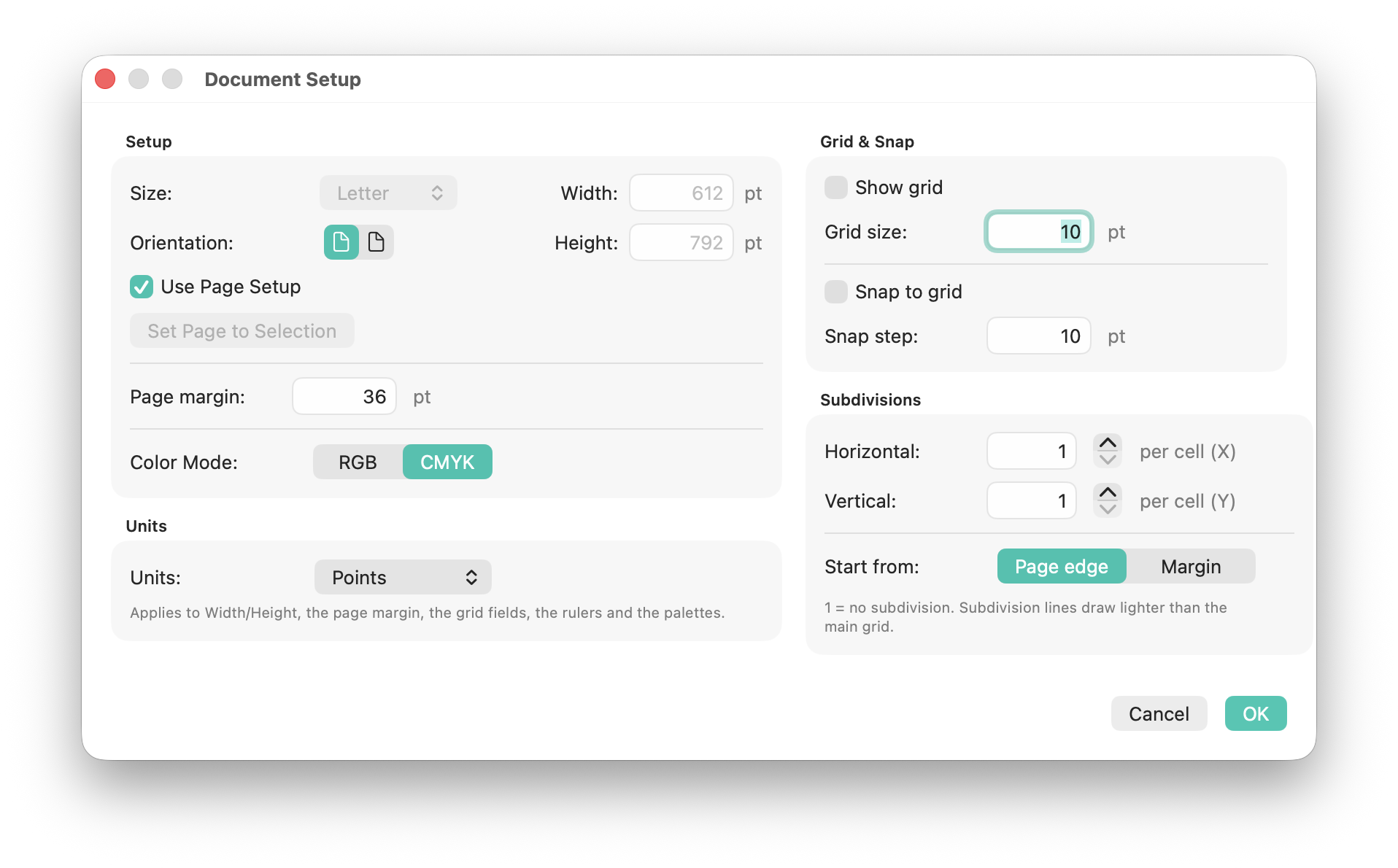
SVG Editor is built for measured work. Document settings define artboard size, orientation, units, grid behavior and color mode, while the canvas keeps rulers and guides visible for precise alignment.
Create or adjust documents with preset sizes such as common print formats, orientation, units, grid settings and document color mode. Document Setup also keeps grid and snap settings in one predictable place.
Because the document remains SVG, these settings help guide editing without hiding the underlying vector artwork.
Show rulers with Command + R, drag guides onto the canvas, lock or hide guides, clear guides, and use Smart Guides while moving objects.
Show the grid, snap to grid, and snap to points. These controls support icon design, technical layout and repeatable geometric construction.
The Measure tool and Info palette expose distance, position and geometry information while editing. They are useful for matching dimensions, checking spacing and documenting layout decisions.
Operations such as Image Trace, path edits, palette changes and scripted actions are grouped into meaningful undo steps so complex experiments can be reversed cleanly.