Print a folded booklet.
Print Booklet puts the pages in printer order for a saddle-stitched or perfect-bound booklet, and Save as PDF shows the imposition before it reaches paper.
Print a folded booklet
Pages in the order the stapler needs.
File ▸ Print Booklet… imposes the pages: 2-up saddle stitch, 2-up perfect bound, or 2-, 3- and 4-up consecutive. Creep, signature size and blank printer spreads are set in the same dialog.
File ▸ Print Settings… keeps crop, bleed and registration marks, colour bars, page information, scaling and tiling in the document; the system print panel then chooses the printer.
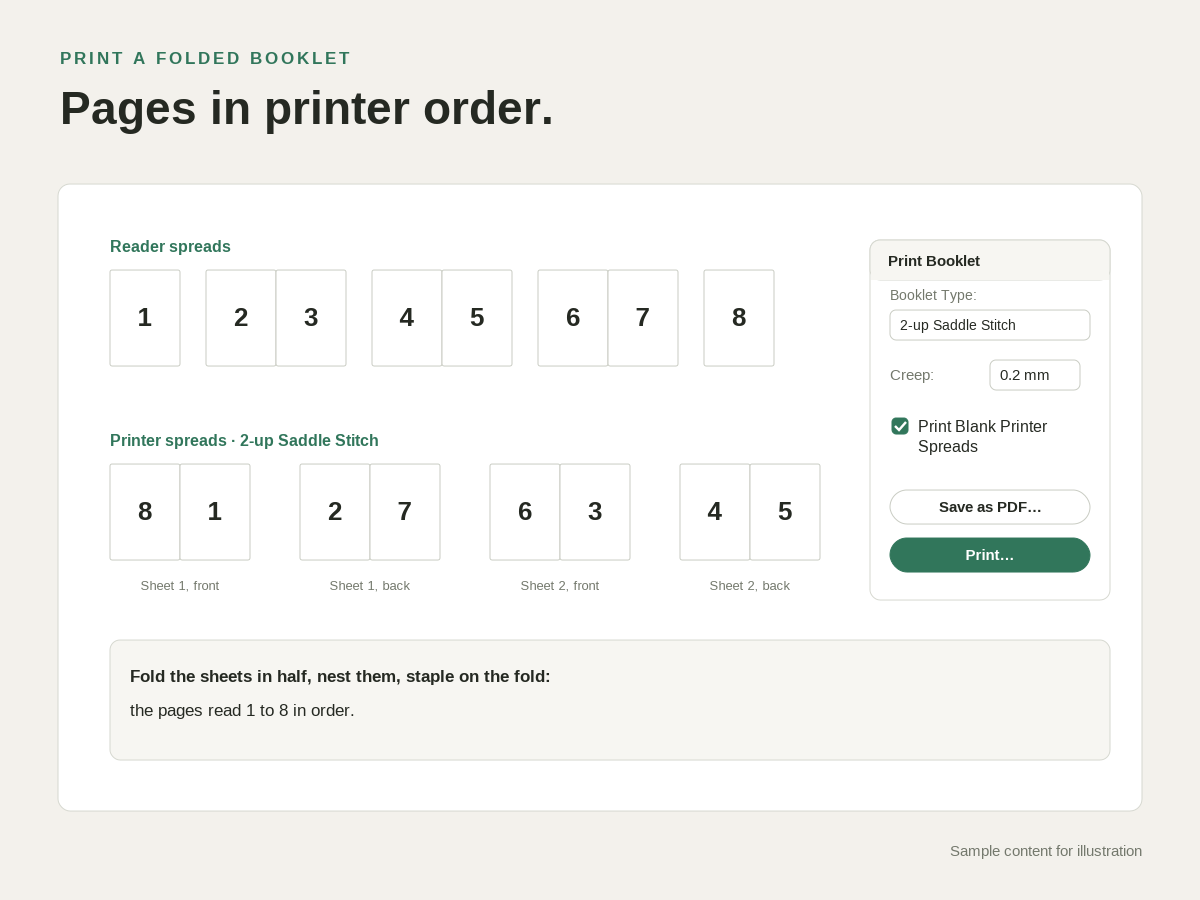
Since MasterPage 26.0, September 2026.
Step by step
Try it with your own document.
- Set the booklet
File ▸ Print Booklet…, Booklet Type: 2-up Saddle Stitch for a stapled booklet. - Check it
Save as PDF… and look at the printer spreads: page 8 next to page 1, 2 next to 7. - Set the marks
File ▸ Print Settings… for crop marks and bleed; they are saved in the document for the next print run.
What you get
A stack of sheets that folds and staples into the booklet, pages in order.