Turn a layer into a smart object.
Shrink a photo for a banner, enlarge it again for the print, and change the blur you put on it last week, without the pixels paying for each change.
The original stays inside the layer.
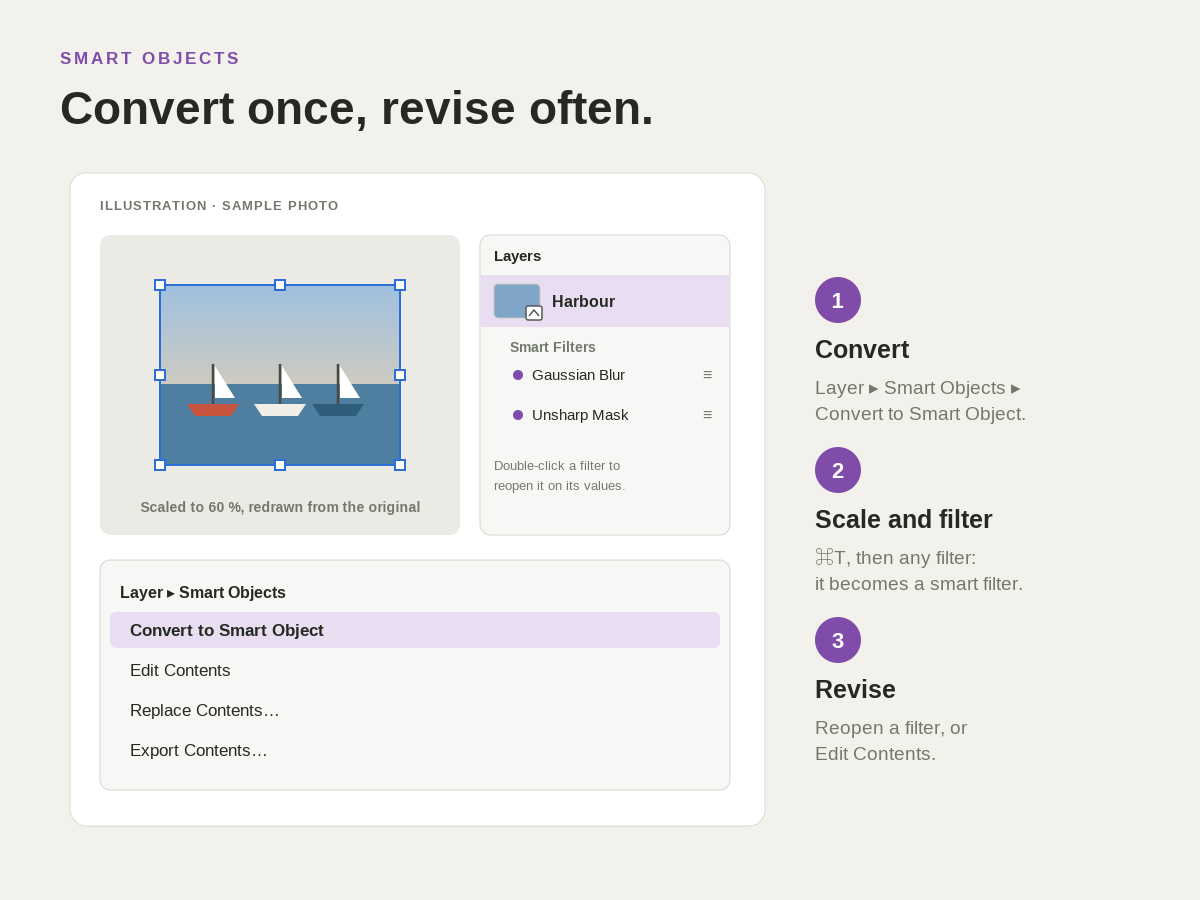
Layer ▸ Smart Objects ▸ Convert to Smart Object, also in the Layers palette's context menu, turns a pixel layer into a smart object in place, as one History step. The picture does not change, and its name, opacity, blend mode, layer style and mask stay on the layer. From then on scaling and rotating redraw it from the original pixels kept inside.
Every filter you run on a smart object becomes a smart filter: it is listed under Layer ▸ Layer Style, where you switch it off or double-click it to reopen its dialog on the values you set. Edit Contents opens the original in a second Flare window: save it there and the layer updates.
Try it on your own photo.
- Convert
Select a pixel layer, then Layer ▸ Smart Objects ▸ Convert to Smart Object. - Scale and filter
⌘T to scale or rotate; any filter of the Filter menu is added as a smart filter. - Revise
Double-click a filter in Layer ▸ Layer Style, or choose Edit Contents to change the pixels inside.
Convert to Smart Object works on one plain pixel layer, the Background included, of an RGB 8-bit document; not on a group, a shape layer or several layers at once. On a pixel layer you want to keep as pixels, Filter ▸ Convert for Smart Filters adds the next filters as smart filters all the same.
A layer you can resize and refilter as often as the job asks; TIFF and PSD keep it a smart object, and Layer ▸ Rasterize ▸ Smart Object makes it pixels again.