Wrap text in the right tag.
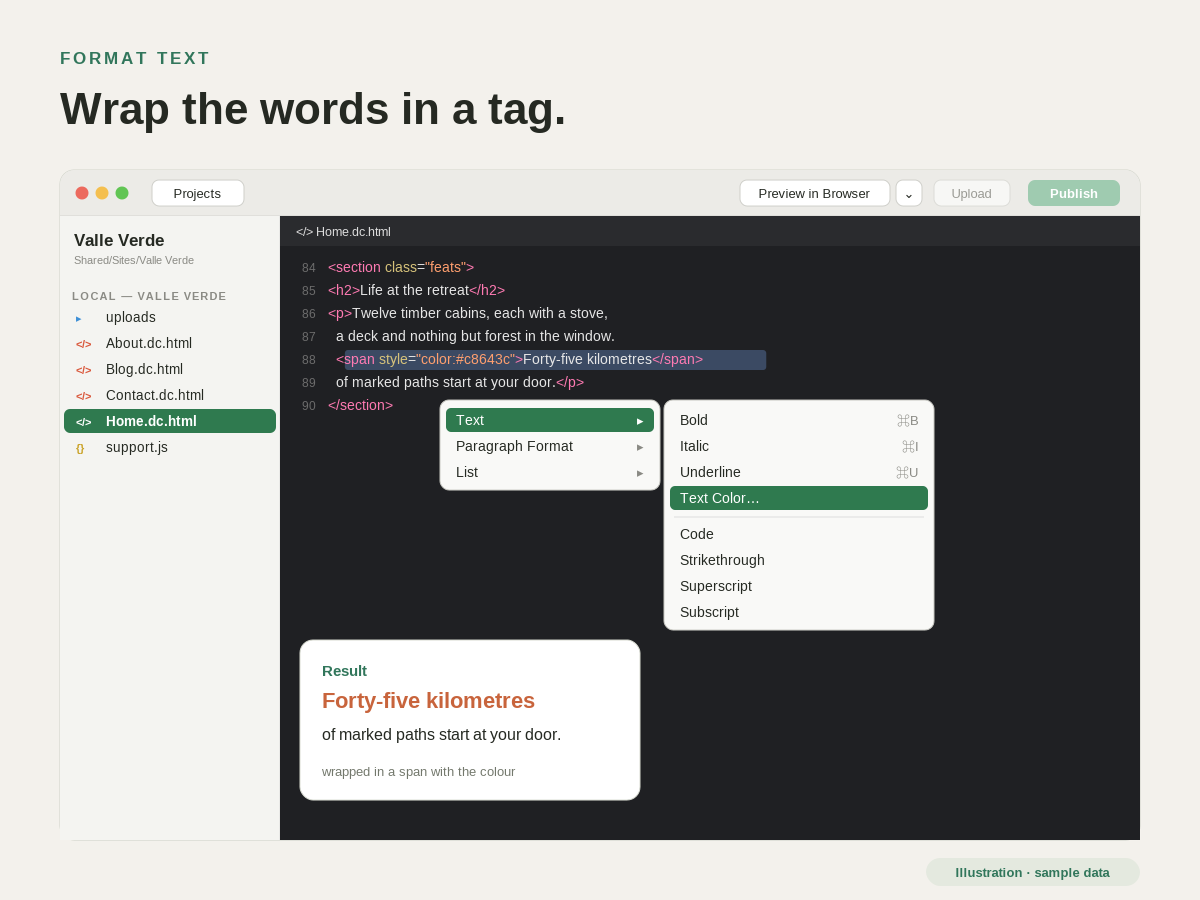
Select a few words in the source and wrap them in strong, em, a heading, a blockquote or a list from the Edit menu, or give them a colour with Text Color….
Format text in the source
Tags without typing them.
Edit ▸ Text wraps the selection in Bold (⌘B, <strong>), Italic (⌘I, <em>), Underline, Code, Strikethrough, Superscript or Subscript. Paragraph Format makes it a paragraph, a heading from 1 to 6, preformatted text, a blockquote or a div; List makes an unordered (⌃⌥⌘U) or ordered (⌃⌥⌘O) list.
Step by step
Colour a phrase.
- Select the words
In the source, select the text you want to stand out. - Choose Text Color…
Edit ▸ Text ▸ Text Color… opens the system colour panel (new in 26.2). - Pick the colour
The selection is wrapped in a span with that colour as a hexadecimal value, ready to move into your stylesheet later.
What you get
Markup you can read.
Each command writes ordinary tags around the selection, so the source stays as readable as if you had typed them.