From the card to the print.
Cull a shoot, develop the raws, fix one part of a photo, then print it, lay it out in a book or send it to the client. Pick the task and see how Prism for Mac does it.
All features
Pick the task in front of you.
New marks the main additions of the latest versions.
Develop
 Develop a RAW photoDecode the raw, set white balance and tone, then presence.
 Saturate colour in Lab NewLab curves and Lab saturation, colour without lightness.
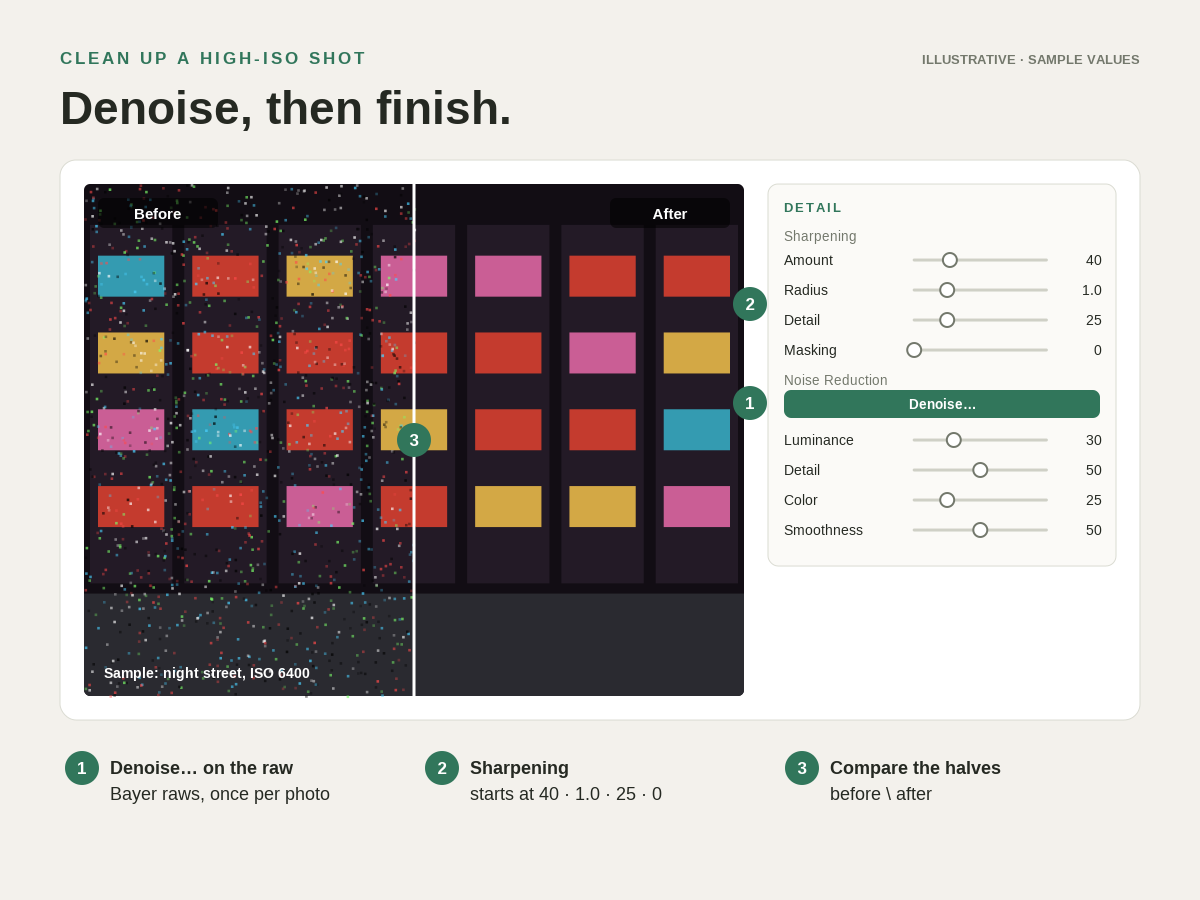 Clean up a high-ISO shotDenoise the raw, then Sharpening and Noise Reduction.
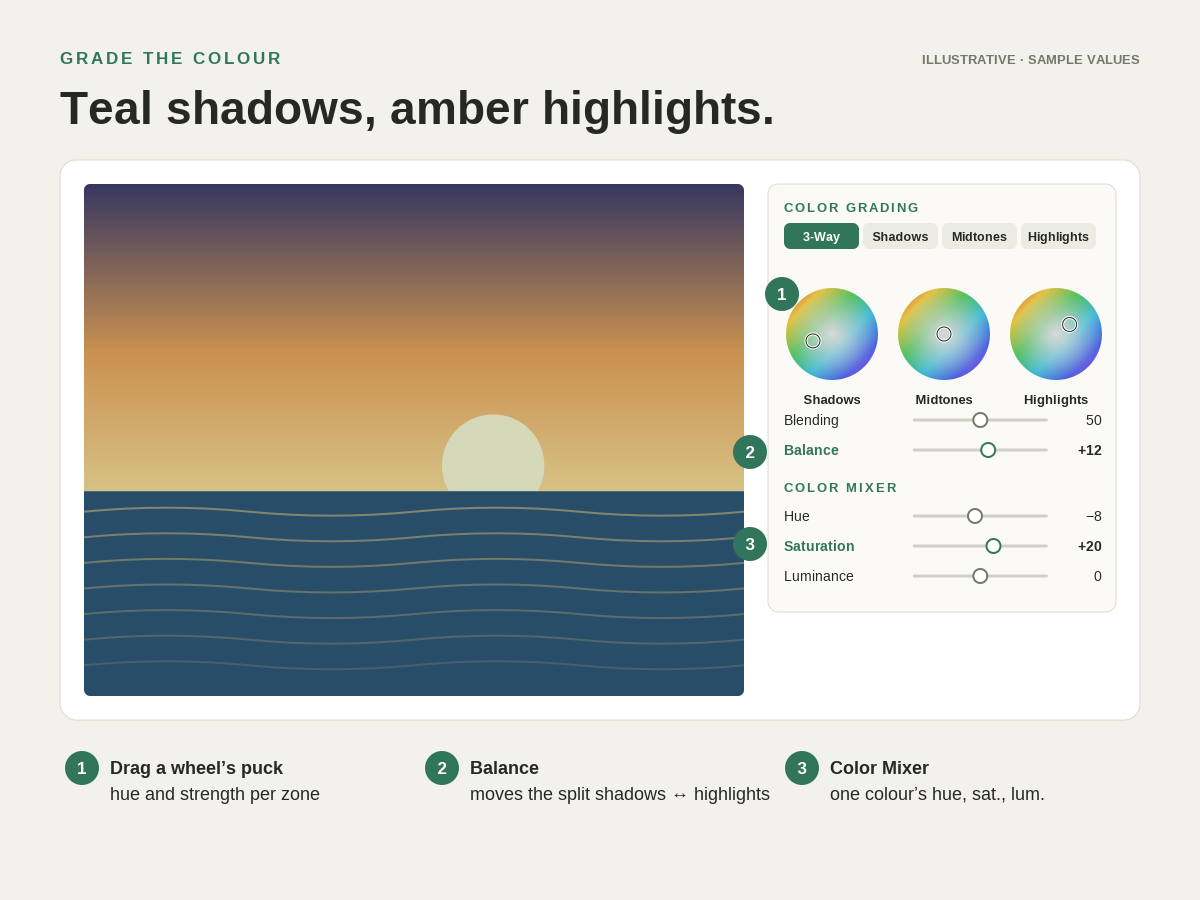 Grade the colourThree-way wheels, the Color Mixer and Calibration.
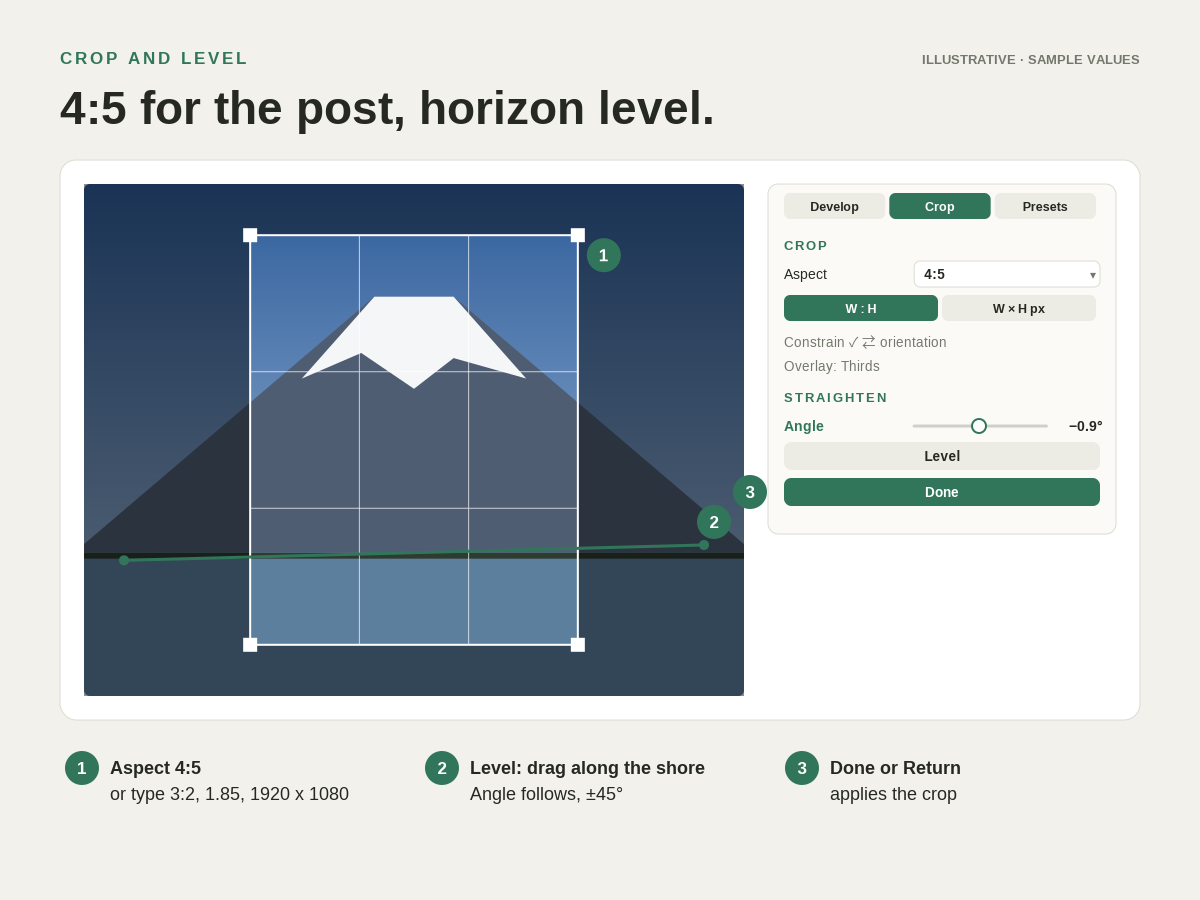 Crop and level a photoAspect presets, custom ratios and pixel sizes, the Level tool.
 Straighten converging lines NewTransform for walls and horizons, Lens for distortion and fringes.
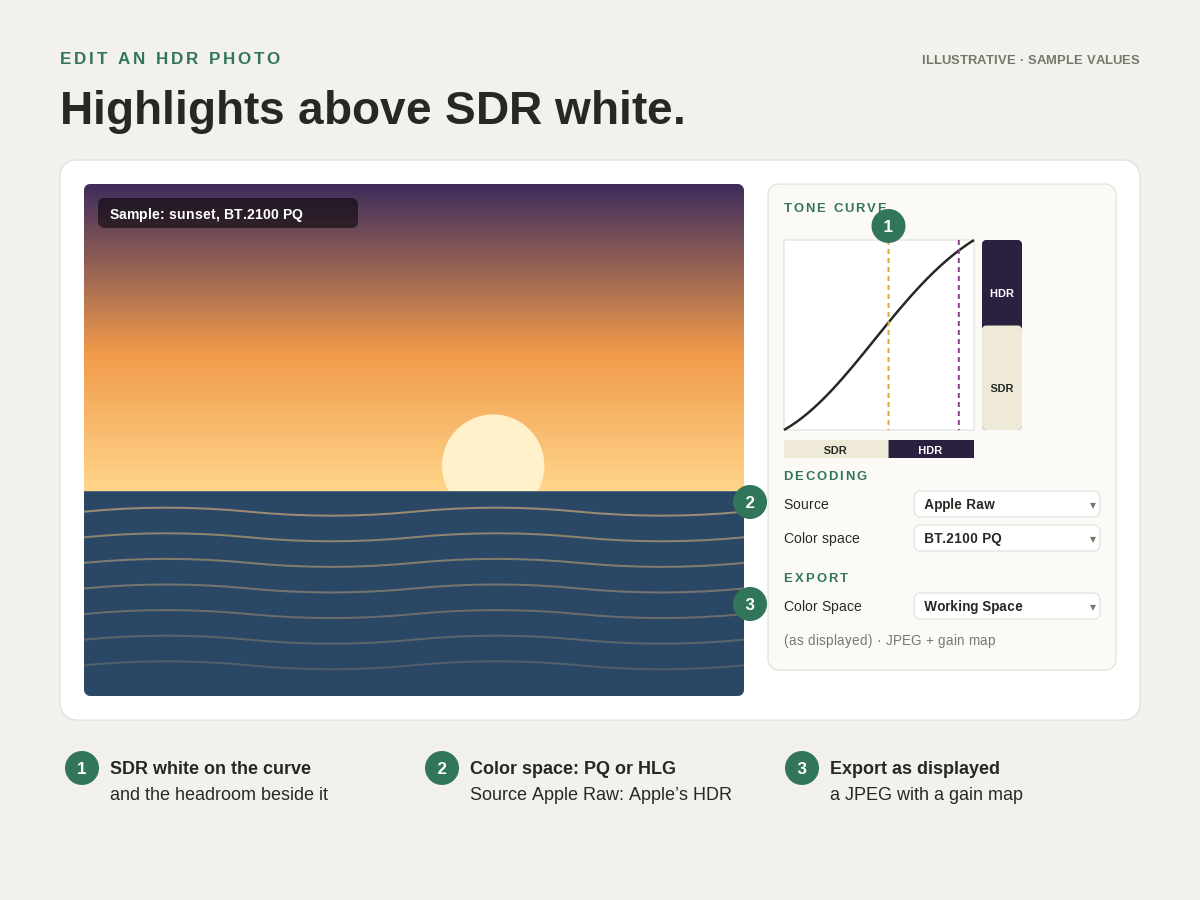 Edit an HDR photo NewPQ and HLG containers, SDR white on the curve, gain-map JPEGs.
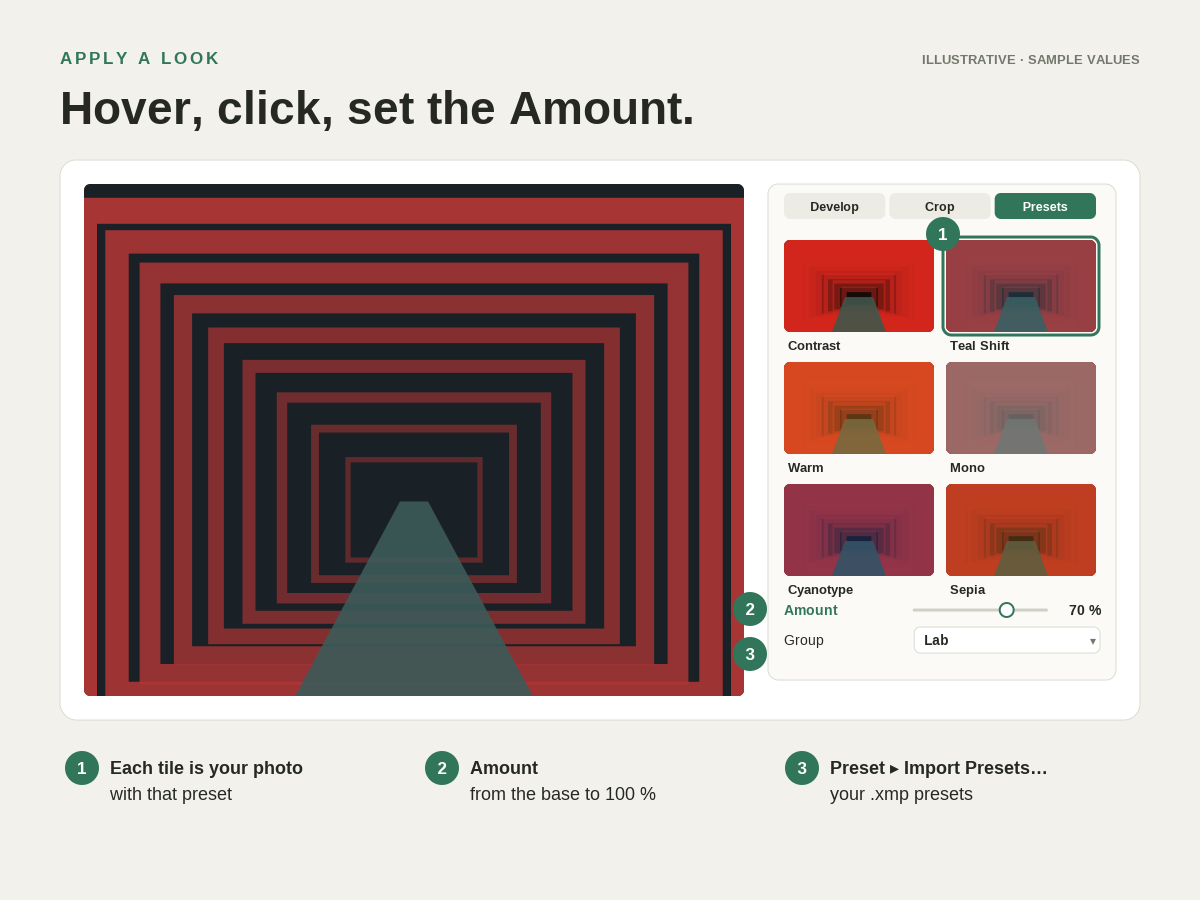 Apply a lookPreset tiles on your photo, Amount, .xmp presets.
 Compare before and afterBefore / After, Compare, Multiple and a second display.
Local and retouch


Whole shoots


Library and capture
Output
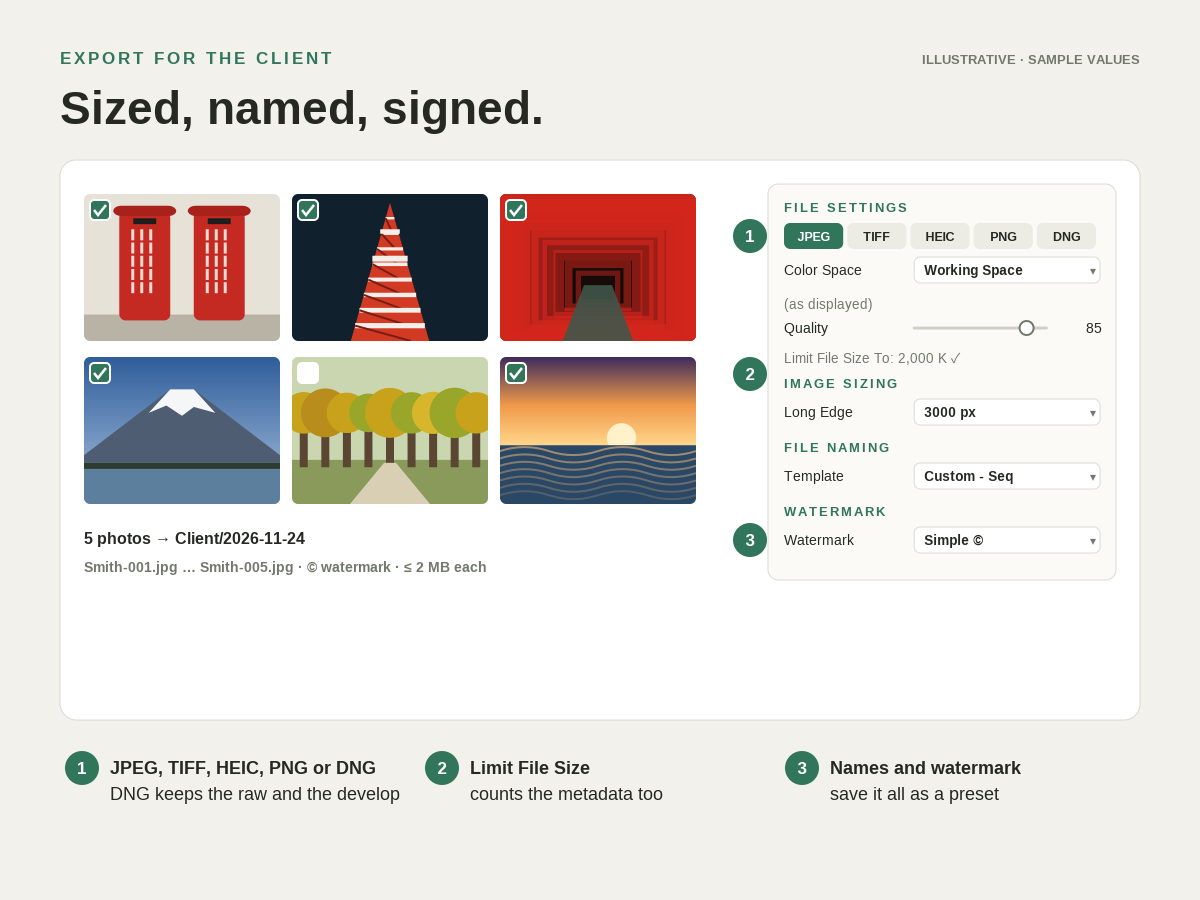 Export for the clientFormats, sizes, file limits, names, watermarks, DNG.
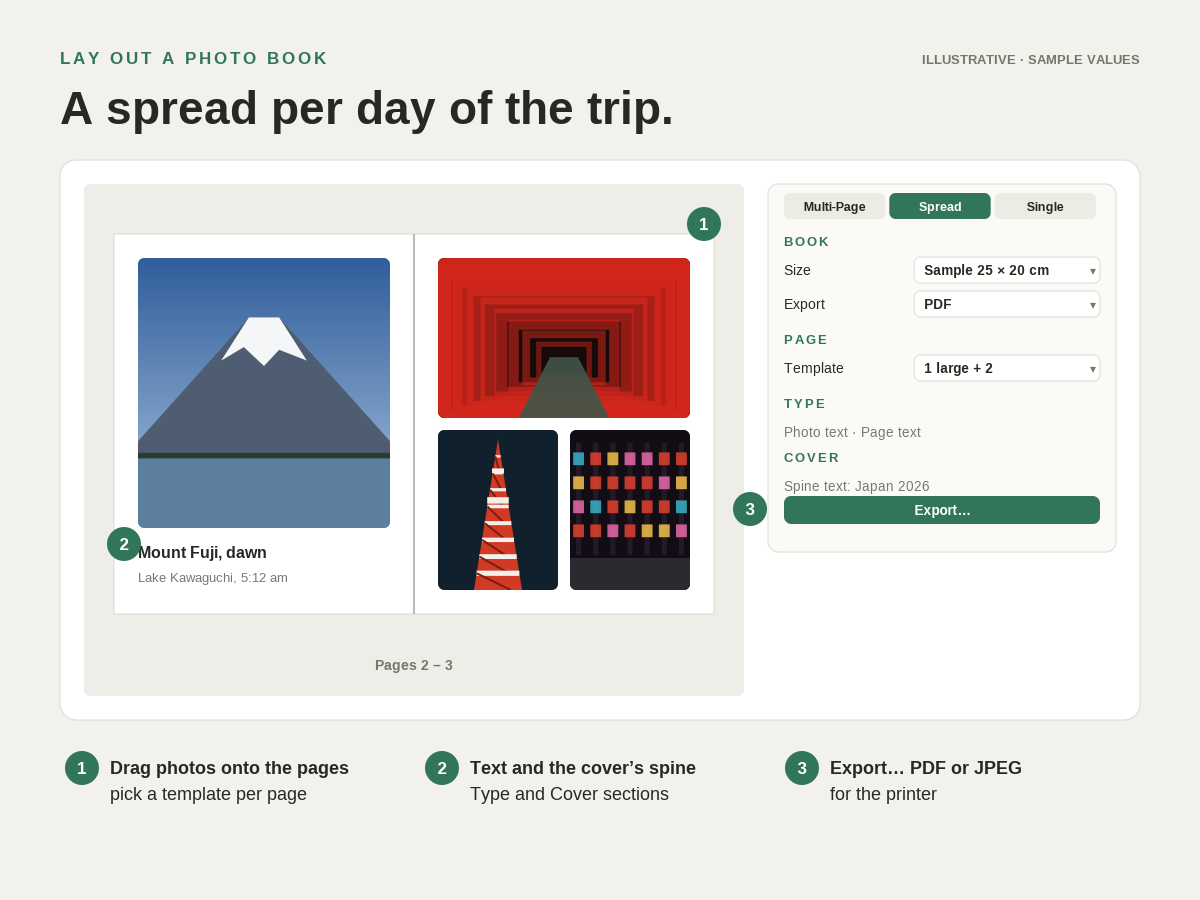 Lay out a photo bookPage templates, text, cover and spine, PDF or JPEG.
 Make a slideshow videoTemplates on your photos, music, video and PDF export.
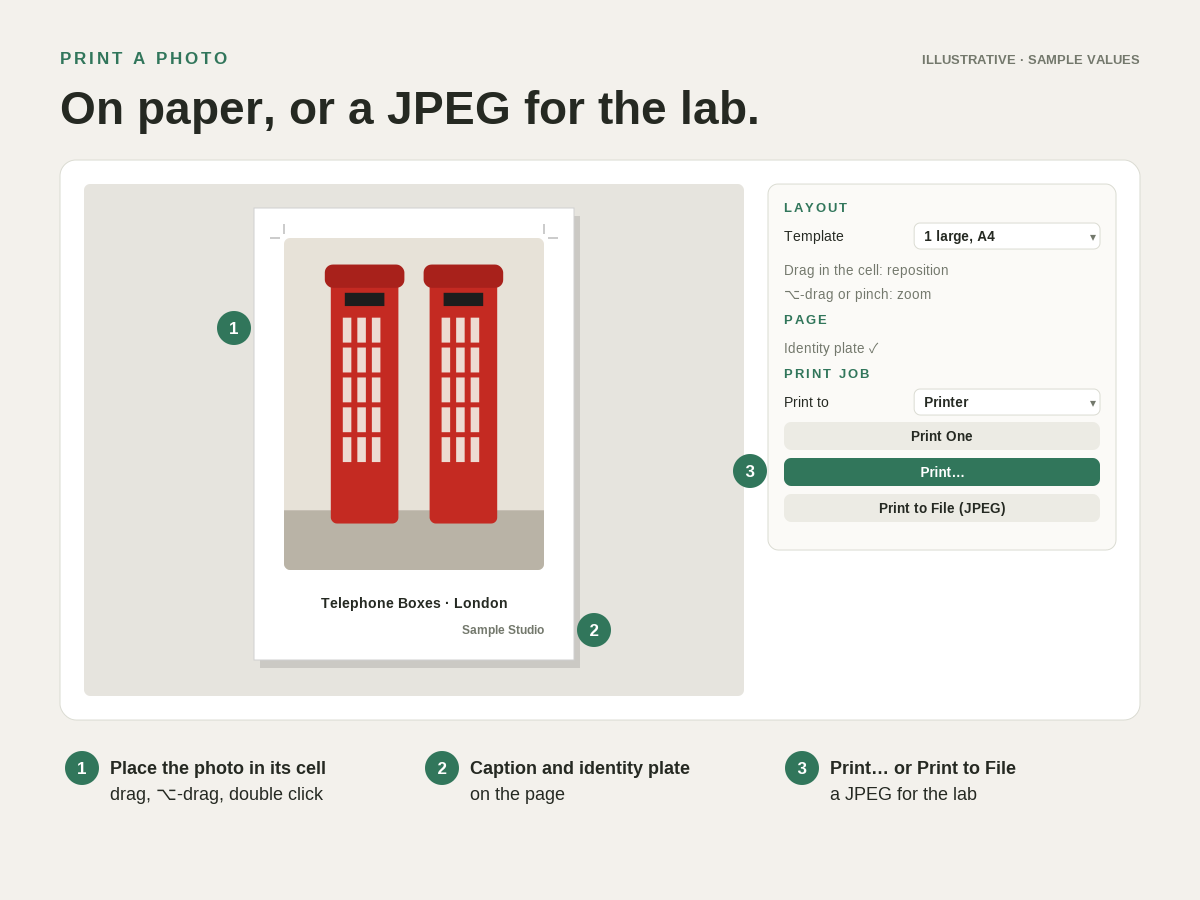 Print a photoTemplates, cells, identity plate, Print to File.
 Publish a web galleryLive preview, browser preview, export, FTP upload.
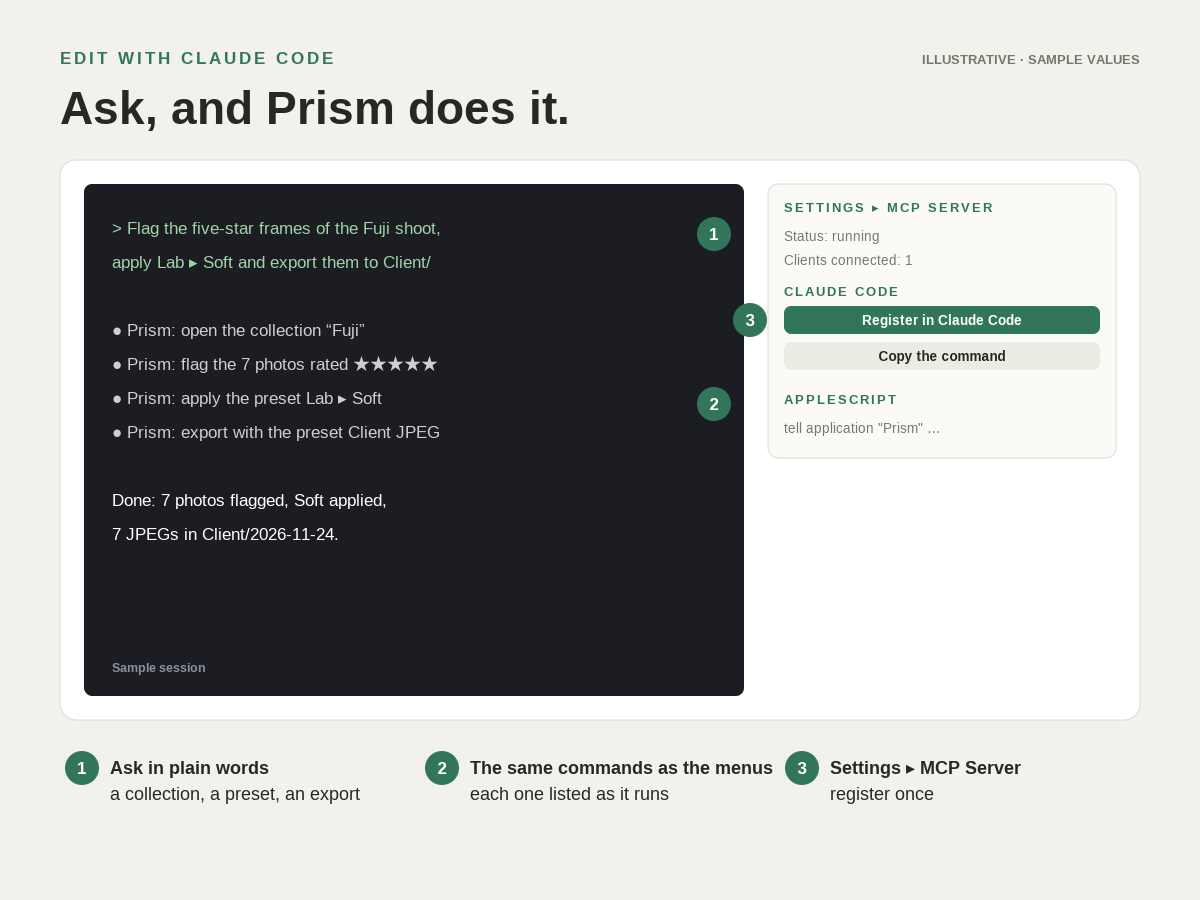 Edit with Claude CodePrism's MCP server for Claude Code, and AppleScript.
Every feature
Everything the app does.
Every panel, tool, menu command and output of Prism for Mac, by what you use it for.
Develop
- Tone Curve: RGB and Lab curves over the histogram, one box or three
- Link a/b Curves and Mirror a/b Curves
- Lab saturation New: colour without touching lightness
- Decoding ▸ Source: Default, Linear or Apple Raw engine
- White Balance: Auto, As Shot or Custom, Temp and Tint
- Profile: Prism Standard, Prism Flat, Embedded, camera profiles, your .dcp
- Tone: Exposure, Contrast, Highlights, Shadows, Whites, Blacks
- Presence: Clarity, Dehaze, Vibrance, Saturation
- Color Mixer: a wheel of eight bands, Hue, Saturation, Luminance
- Color Grading: 3-Way, Shadows, Midtones, Highlights, Global; Blending, Balance
- Calibration: shadow tint, red, green and blue primaries
- Sharpening: Amount, Radius, Detail, Masking
- Noise Reduction: Luminance, Detail, Contrast, Color, Color Detail, Smoothness
- Denoise…: a cleaned raw saved as a new DNG (Photo ▸ Enhance…)
- Effects ▸ Vignette
- Grain: Amount, Size, Roughness
- Profile Lab…: turn a develop into your own look and .dcp
- OpenFX plug-ins: under the Profile, in the direct download
Crop and geometry
- Crop: aspect presets, Constrain, swap orientation
- Custom crop: your own ratio W : H or size W × H px
- Crop overlays: Thirds, Grid, Golden Ratio, Golden Spiral, Diagonal, Triangle, Center
- Straighten: Angle slider and the Level tool
- Lens ▸ Profile: Distortion and Vignette from the lens profile
- Lens profile picker: Auto, or make and model
- Aberration: the profile's colour fringes
- Transform New: Vertical, Horizontal, Rotate, Aspect, Scale, X and Y Offset, Constrain Crop
- Rotate Left, Rotate Right, Flip Horizontal, Flip Vertical
Colour and HDR
- HDR thumbnails and viewer: PQ, HLG, gain maps and float files on an EDR display
- Gain-map photos: developed with the map applied
- Color space ▸ PQ and HLG New: assign a Rec. ITU-R BT.2100 container
- Color space ▸ Display P3 and Adobe RGB (1998): assign a wide-gamut container
- SDR | HDR strip: SDR white and the headroom under the Tone Curve
- Working space: the space the develop works in
- Output gamut: sRGB, Display P3 or Rec.2020 in the viewer
Masks
- Adjustment Layer: the whole photo as a layer
- Select Subject, Select Sky, Select Background
- People
- Water, Vegetation, Architecture, Ground
- Objects: draw a box around a thing
- Depth Range
- Radial, Linear and Reflected Gradient
- Brush: Size, Feather, Flow
- Polygon and Subtract Polygon
- Color Range and Luminance Range
- Invert Mask, Feather Mask, Mask Amount
- Show Mask, Hide Layer, Reorder Masks
Retouch
- Remove layer: Remove, Heal and Clone spots
- Spot Size, Feather, Opacity: and the source in view
- Find Dust Spots: with a Dust Sensitivity slider
- Visualize Spots (A): an edge map that shows the dust
Presets and settings
- Presets strip: tiles previewed on your own photo
- Preset Amount
- Add to Favorites
- Save, Update, Rename and Delete Preset
- Import Presets…: presets, .xmp profiles, .cube LUTs, folders, .zip packs
- Export Preset…: as an .xmp file
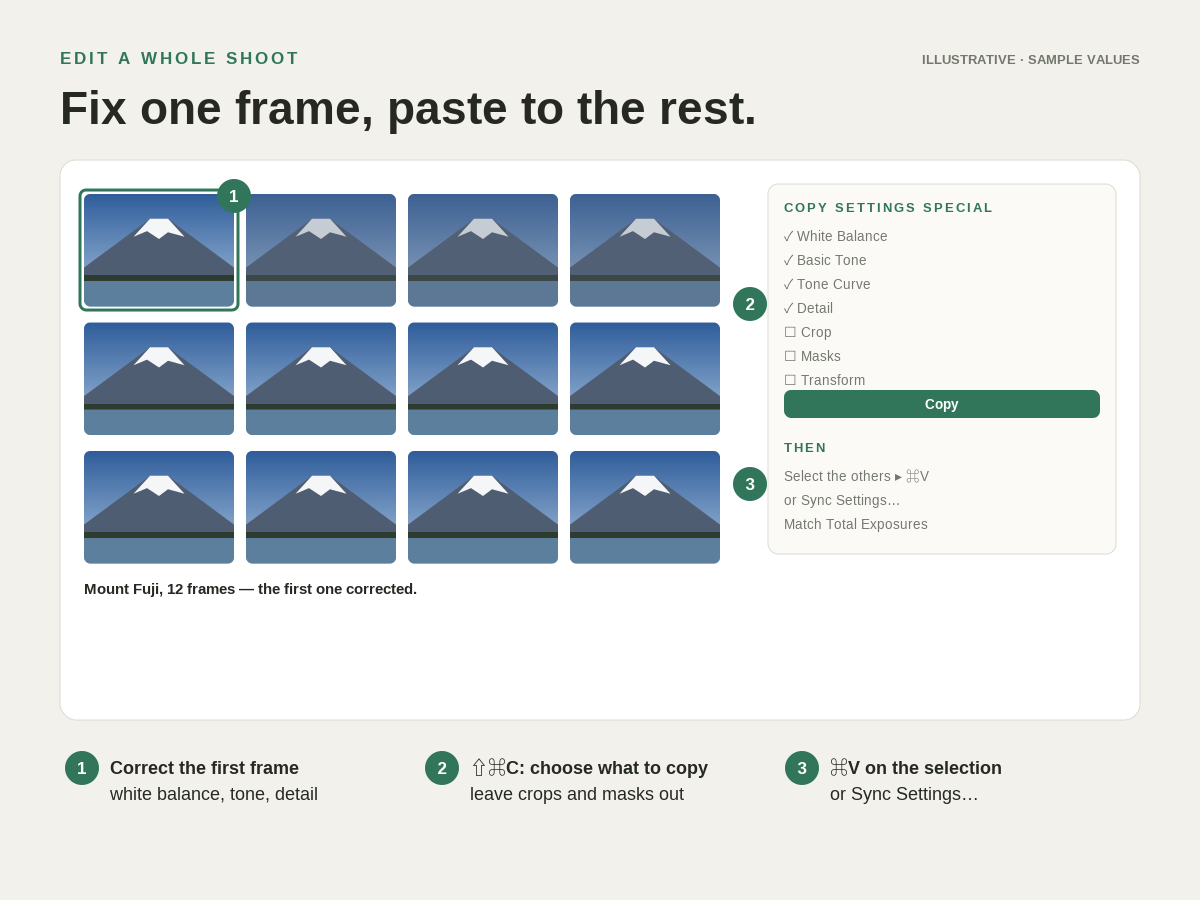
- Copy Settings… and Paste Settings
- Copy Settings Special… (⇧⌘C): pick what to copy
- Paste Settings from Previous, Sync Settings…, Auto Sync
- Auto Tone (⌘U) and Auto White Balance (⇧⌘U): on the selected photos
- Reset and Match Total Exposures
View and compare
- Before / After (\)
- Viewer: Single, Compare, Multiple
- Secondary Display: the photo on a second screen
- Histogram: per channel in the RGB and Lab curves
- Info: camera, lens, shutter, aperture, ISO, focal length, GPS
Whole shoots
- Set Flag: Flagged (P), Unflagged (U), Rejected (X)
- Set Rating: none to five stars, [ and ]
- Set Color Label: Red, Yellow, Green, Blue, Purple
- Filters: Flagged, Rejected, Unrated, Edited, Unedited, No Label, Virtual Copies…
- Create Virtual Copy, Set Copy As Master
- Stacking: Group Into Stack, Unstack, Split, Expand, Collapse, move within
- Auto-Stack By Capture Time…
- Keyword Shortcut (⇧K) and Keyword Sets (⌥1–9)
- Color Label Sets
- Edit Capture Time…: and Revert Capture Time to Original
- Copy, Paste and Sync Metadata
Library
- New Library, Open Library, Open Recent: the .prismlib library
- Grid and list views: Name, Date, Dimensions, Flag, Label, Rating, Type
- Group by Folder
- Search Photos and Search Collections
- New Collection… (⌘N): collections with cover tiles
- Save Metadata to Files and Read Metadata from Files: XMP sidecars
- Update DNG Previews & Metadata, Write Embedded Metadata Now
- Resolve Metadata Conflict…
- Optimize Library… and Back Up Library Now…
- Import from Another Library… and Export as Library…
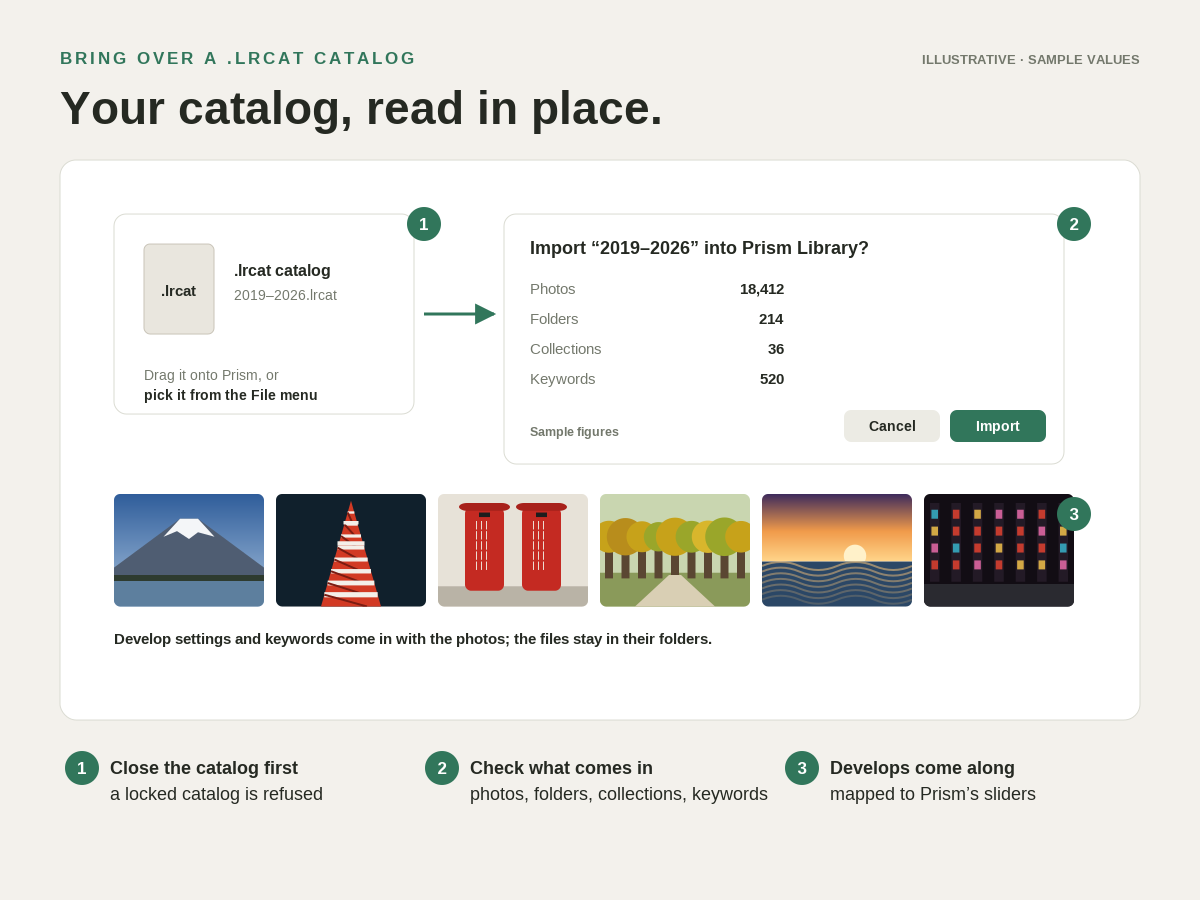
- Catalog import: folders, collections, keywords and develops from an .lrcat
- Open Sample Library: photos to try every tool on
Import and capture
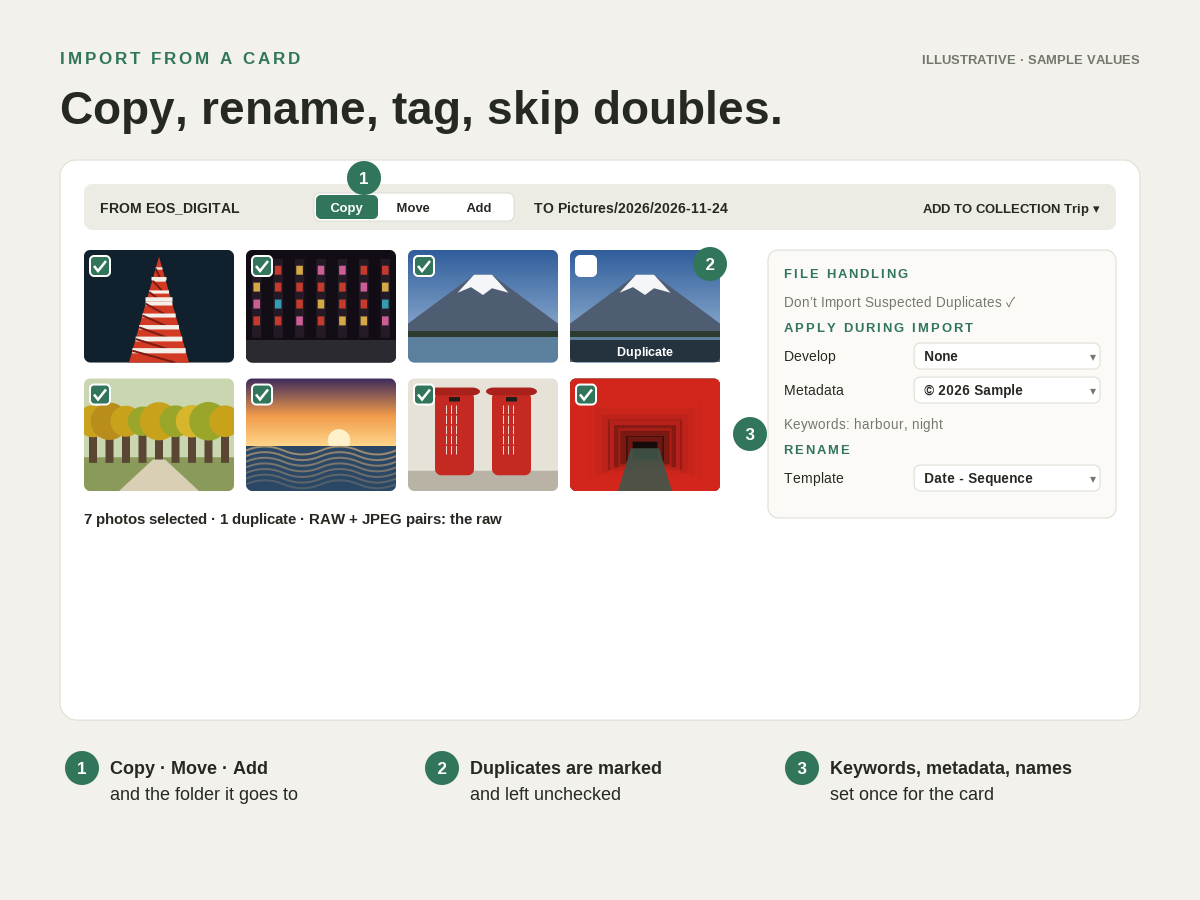
- Import Photos and Video… (⇧⌘I): Copy, Copy as DNG, Move or Add
- File Naming: templates, custom text, start number
- Apply During Import: develop settings, metadata preset, keywords
- Duplicates and Build Previews
- Import presets: save the window's settings and reuse them
- Auto Import: a watched folder that imports by itself
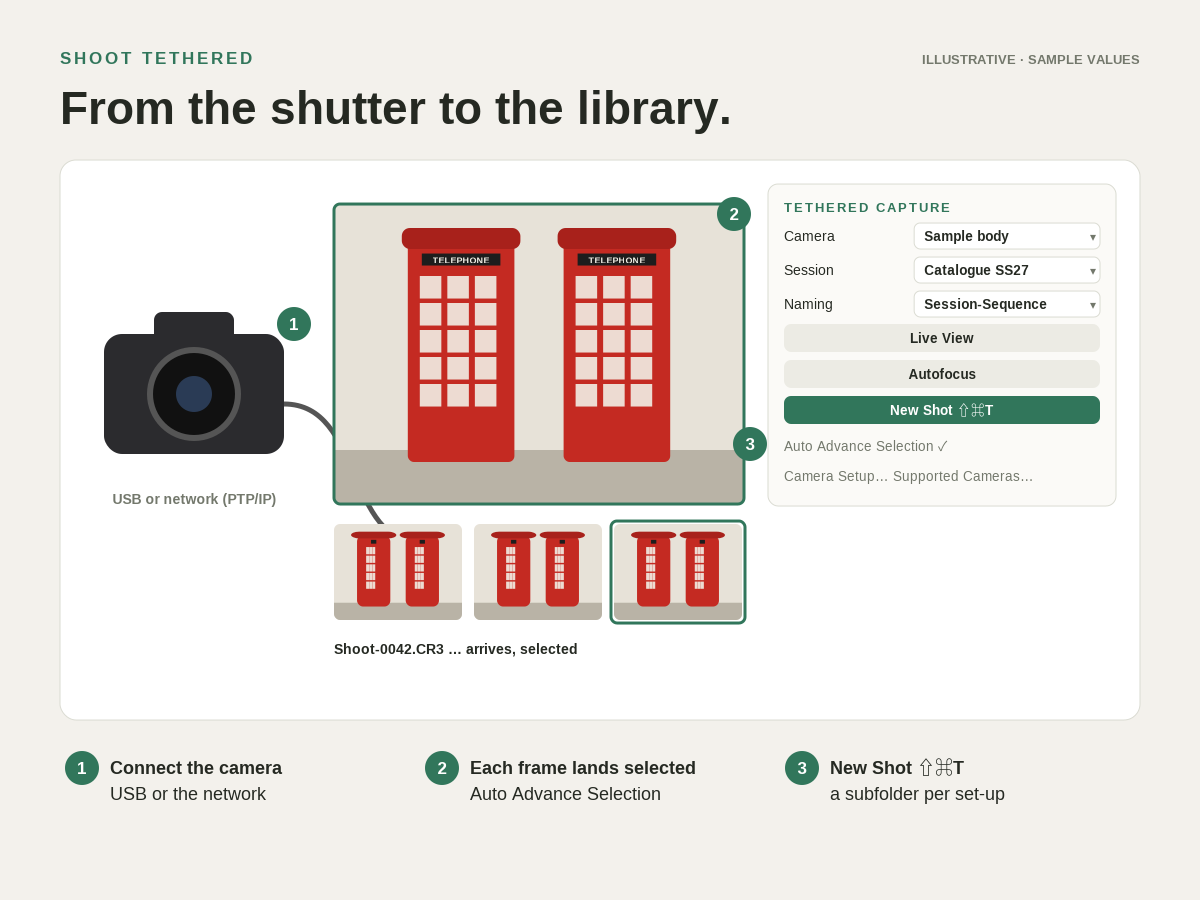
- Tethered Capture: Start, New Shot, Auto Advance Selection
- Live View and Autofocus
- Camera Setup… and Supported Cameras…
- Convert Photo to DNG…
- Edit in Flare (⌘E): a 16-bit TIFF copy opened in Flare
Export
- Export… (⇧⌘E), Export with Previous, Export with Preset
- Image Format: JPEG, TIFF, HEIC, PNG, DNG or Original
- Bit Depth and TIFF Compression: 8 or 16 bits; None, LZW, ZIP
- Color Space ▸ Working Space (as displayed): what you see, exported
- Color Space: sRGB, Display P3, Adobe RGB (1998), ProPhoto RGB, Rec. 2020
- HDR export: Rec. 2020 PQ and Rec. 2020 Linear
- Resize to Fit: edges, Width & Height, Megapixels, Percentage; Don't Enlarge
- Limit File Size
- Sharpen For Output: Screen, Matte or Glossy Paper; Low, Standard, High
- Rename To: file name templates
- Metadata: Copyright Only to All; Remove Person and Location Info
- Watermark: text or graphic, opacity, size, anchor, shadow
- Existing Files, Put in Subfolder, Add to This Library, Add to Stack
- After Export: Show in Finder, open in another app, compose an email
Book
- Book Size, Cover Size, Custom Sizes…
- Page templates, Auto Layout, Clear Layout
- Add Page and Add Blank
- Page Numbers and Logo Page
- Photo Cells, Text Safe Area, Page Grid, Show Guides
- Export Book: to PDF or JPEG
Slideshow
- Template Browser: start from a ready slide design
- Options: Zoom to Fill Frame, Stroke Border, Cast Shadow
- Overlays: Identity Plate, Rating Stars, Text Overlays, Watermark
- Backdrop: Color Wash, Background Color, Background Image
- Titles: Intro Screen and Ending Screen
- Music: several tracks, Sync Slides to Music, Cut on Downbeats, Fit to Music
- Playback: Pan and Zoom, Crossfades, Random Order, Repeat Slideshow
- Play: in the centre or full screen
- Export Video… and Export PDF…
- Layout Style: Single Image / Contact Sheet, Picture Package, Custom Package
- Margins, Page Grid, Cell Size, Cell Spacing
- Image Settings: Zoom to Fill, Rotate to Fit, Repeat One Photo per Page, Stroke Border
- Add Cell and Add to Package
- Rulers and Guides: with Page Bleed
- Print Job: Print Resolution, Print Sharpening, Print Adjustment
- Print…, Print One, Page Setup…
- Print to File…: the pages as JPEG files
Web
- Site Title, Collection Title, Collection Description
- Contact Info and Web or Mail Link
- Grid Pages: rows, columns, cell numbers
- Image Pages: size, photo borders, drop shadow
- Preview in Browser…
- Export… and Upload…: to a folder, or to your server over FTP
Automation
- MCP Server: Claude Code and Claude Desktop drive Prism
- Register in Claude Code: one click, in the direct download
- AppleScript «do script»: the same actions as the menus
App
- What's New examples: Masks, Remove and Lab Saturation to try in the welcome
- Rainbow Factory account: email, Apple, Google or Microsoft sign-in
- Settings: General, Interface, Workspace, Presets, File Handling, Performance, Updates
- Send Feedback… and Feedback Chat